
Reviews
Vos graphiques ajoutent une belle touche à mes présentations et je les ai récemment utilisés pour l'une de mes réunions générales. Votre boîte à outils ajoute du professionnalisme à mes diapositives. Au lieu d'utiliser des cliparts standards.
J'avais besoin d'un nouveau regard sur certaines de mes diapositives. J'ai essayé de trouver un moyen de créer un effet de pinceau, de souligner, d'accentuer, d'ajouter de la couleur et les marqueurs manuscrits étaient exactement ce qu'il fallait. Très facile à utiliser, facile à ajuster la taille, à changer la couleur. C'était une solution abordable et parfaite et je suis heureux de la recommander.
L'aspect net et épuré des graphiques, et le fait qu'il m'ait permis d'éditer et de changer facilement les couleurs pour les adapter au modèle, ont été les principales raisons de mon achat.
Description
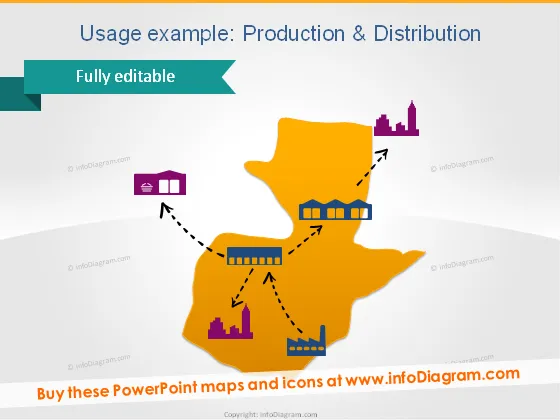
Usage example: Production & Distribution
Slide Content
The slide illustrates the concept of Production and Distribution within a geographical context using a stylized map and icons. The map appears to represent an abstract region with connections between a factory, a warehouse, and a bar chart indicative of performance metrics. Each icon (factory, warehouse, and performance chart) symbolizes a stage or component in the production and distribution process. The factory likely represents the manufacturing phase, the warehouse signifies storage or logistics, and the bar chart may indicate sales or distribution results.
Graphical Look
- The slide uses a bold color scheme with a bright orange for the map and contrasting dark and light purple for icons and text, respectively.
- A large, abstract map shape dominates the center of the slide.
- Three icons placed on the map: a factory, a warehouse, and a bar chart each indicating different stages of production and distribution.
- Dotted arrows connect the factory to the warehouse and the warehouse to the bar chart, illustrating the flow of goods and information.
- The icons and the arrows have shadows, giving a slight 3D effect and emphasizing the connections between them.
- The slide title is at the top in a large, bold font, with a subtitle below it in a smaller size and different color to differentiate it.
- A ribbon-shaped banner with the text "Fully editable" is placed at the upper left corner, presumably indicating that the slide's content can be customized.
The overall look of the slide is modern and business-like, with a simple yet striking color palette that captures attention. The use of distinct shapes and icons makes the slide easy to understand at a glance.
Use Cases
- Presenting the flow of goods in a company from manufacturing to market in internal strategy meetings.
- Illustrating the supply chain process to potential investors or partners in business proposals.
- Using in educational settings, such as business courses, to explain production and distribution principles.
- Demonstrating a company's operational structure during trade shows or conferences.
How to Edit
How to edit text & colors

How to expand / shorten diagram

How to Replace Icons in infoDiagram PPT


