
Reviews
Your slides are my "secret sauce" when it comes to presenting my ideas to clients. I save a lot of time.
J'avais un délai de livraison à respecter et je n'avais pas le temps de créer une variété de modèles de diapositives. Infodiagram m'a proposé des options faciles à télécharger et à personnaliser en fonction de mes besoins !
Vos diapositives suscitent souvent de précieux commentaires et idées de la part de mon équipe, ce qui améliore les diapositives finales.
Description
Production Company Performance
Slide Content
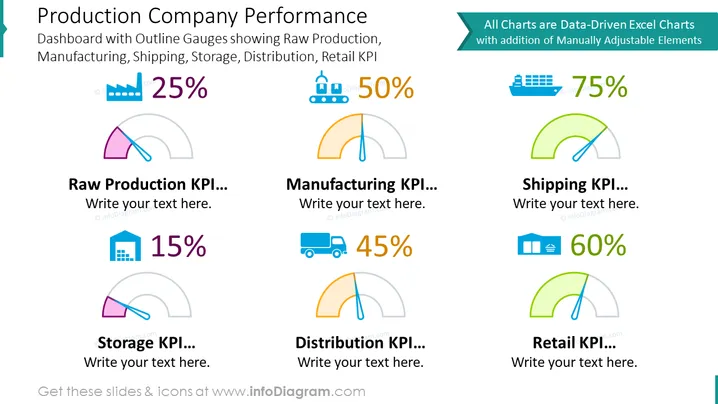
The PowerPoint slide titled "Production Company Performance" is designed to present various key performance indicators (KPIs) critical to a production company's operations. It includes outline gauges for "Raw Production," "Manufacturing," "Shipping," "Storage," "Distribution," and "Retail," each with a designated percentage to showcase performance levels. The slide claims that all charts are built with data-driven Excel components supplemented by manually adjustable elements, enabling customization. Each section has space for additional explanatory text.
Graphical Look
- The slide has a white background with six distinct sections, each representing a different production KPI.
- The title of the slide is in large, bold font, highlighted in dark gray with a blue left-border highlight.
- Each KPI is accompanied by a semi-circular outline gauge with a colored fill indicating the performance percentage.
- The gauges vary in color – purple, orange, green, and blue – providing visual differentiation between the KPIs.
- Accompanying each gauge is a percentage in large font, reflecting the value of the respective KPI.
- Every KPI section contains a colorful icon illustrating the area of performance it is measuring, such as factory or shipping truck icons.
- There is also a placeholder text box beneath each KPI gauge for additional information.
The slide uses a clean and organized layout with contrasting colors and simple icons that visually categorize different operational metrics, making the data easy to understand at a glance. The infographic style of the gauges adds an engaging visual aspect to the slide's overall polished and professional appearance.
Use Cases
- Presenting annual or quarterly business performance reviews to show progress in various operational areas.
- Sharing KPIs with stakeholders or investors during company meetings to highlight efficiency and current operational status.
- Providing departmental updates in internal meetings to communicate targets and achievements in specific production areas.
- Utilizing in workshops or training sessions to explain the importance of monitoring and managing various aspects of production performance through KPI tracking.
How to Edit
How to edit text & colors

How to expand / shorten diagram

How to Replace Icons in infoDiagram PPT


