
Reviews
Your graphics add a nice touch to my presentations and I recently used them for one of my all-hands meetings. Your toolbox adds professionalism to my slides. Instead of using standard clipart.
I needed a fresh look at some of my slides. I've tried to find a way to create a paintbrush effect, to underline, accentuate, add some color and the handwritten markers were just the things. Very easy to use, easy to size, change the color. It was an affordable, perfect solution and I'm happy to recommend it.
The crisp, clean look of the graphics, and the fact that it allowed me to easily edit and change the colors to match the template was my main reason for purchasing them.
Description
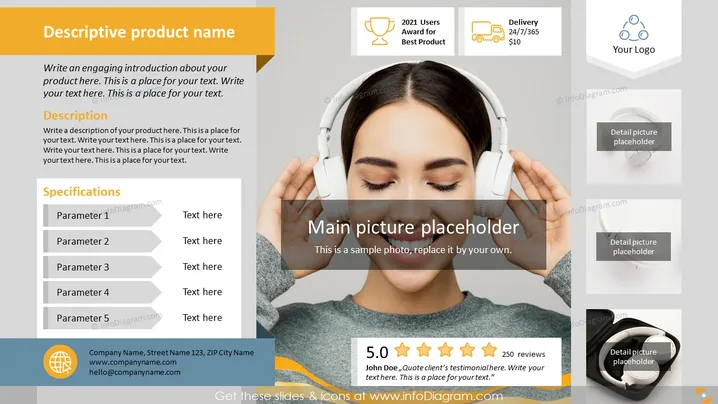
Product One Pager Leaflet Template with Multiple Views
Slide Content:
The PowerPoint slide is designed as a one-pager for a product, featuring areas for a product introduction, description, specifications, and customer testimonials. It includes:
- A section for an engaging introduction about the product.
- A detailed description area to elaborate on product features.
- A specifications list with placeholders for five parameters, each needing a brief explanation.
- A customer testimonial spot with a five-star rating display.
- Contact details for the company, including an address, website, and email.
- Icons indicating awards, delivery details, and company logo placement.
Graphical Look:
- A prominent central image placeholder, labeled "Main picture placeholder," suggesting where to insert a product photo.
- Three smaller image placeholders.
- A five-star rating graphic and a quote bubble for customer testimonials.
- A footer section with the company’s contact information and a web address.
Overall, the slide has a professional and modern look with a balanced use of space and icons that are visually appealing and easy to understand.
Use Cases:
- In a business presentation to introduce a new product to potential investors or stakeholders.
- At a trade show or exhibition, displayed on a monitor to attract and inform attendees about the product.
- During a sales meeting to provide a quick overview of the product to potential clients.
- As part of a marketing package sent to media outlets or reviewers for product promotion.
How to Edit
How to edit text & colors

How to expand / shorten diagram

How to Replace Icons in infoDiagram PPT


