
Reviews
Your graphics add a nice touch to my presentations and I recently used them for one of my all-hands meetings. Your toolbox adds professionalism to my slides. Instead of using standard clipart.
I needed a fresh look at some of my slides. I've tried to find a way to create a paintbrush effect, to underline, accentuate, add some color and the handwritten markers were just the things. Very easy to use, easy to size, change the color. It was an affordable, perfect solution and I'm happy to recommend it.
The crisp, clean look of the graphics, and the fact that it allowed me to easily edit and change the colors to match the template was my main reason for purchasing them.
Description
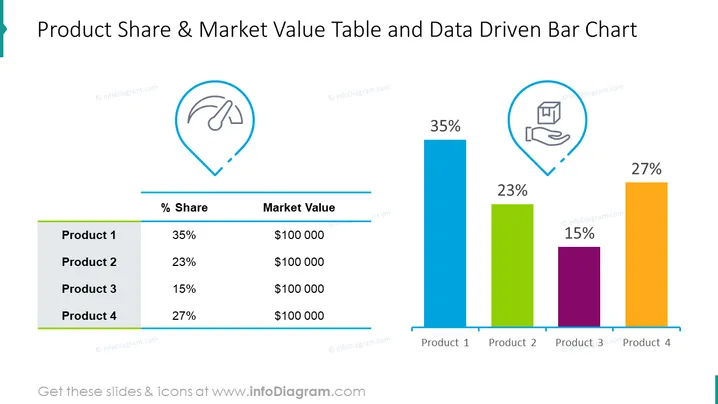
Product Share & Market Value Table and Data Driven Bar Chart
Slide Content
The slide presents a comparison of product shares and market values through a table and a bar chart. The left side features a table with two columns -- "% Share" showing the percentage share of each product and "Market Value" showing the specific market value in dollars. Product 1 leads with a 35% share and a market value of $100,000. Products 2, 3, and 4 follow with 23%, 15%, and 27%, respective shares; each has the same market value of $100,000.
Graphical Look
- A boldly colored title is at the top of the slide in large font.
- Two icons in blue map marker shapes are located towards the top corners, each enclosing a white illustration: a speedometer on the left and a hand with a wallet on the right, symbolizing performance and cost, respectively.
- A horizontal line under the icons separates the title from the main content.
- A simple two-column table is on the left side of the slide, displaying product share percentages and market values with a light gray background for the header row.
- A data-driven bar chart to the right shows the percentage share of four products, labeled "Product 1" to "Product 4", with each bar of a different color (blue, green, purple, and orange).
- Above each bar in the chart, the percentage value is prominently displayed.
- Colors used include teal, blue, green, purple, orange, gray, and white.
The slide features a clean, modern design with a balanced mix of textual information in a table and a colorful bar chart displaying key data points.
Use Cases
- Presenting sales figures and market performance for different products during a business meeting.
- Comparing product performance to teammates or stakeholders in a visually engaging manner.
- Using in a pitch to potential investors to showcase the success of various products in a portfolio.
- Accompanying a report to higher management, with visual aids emphasizing market share and value for strategic decision-making.
How to Edit
How to edit text & colors

How to expand / shorten diagram

How to Replace Icons in infoDiagram PPT


