
Reviews
Your graphics add a nice touch to my presentations and I recently used them for one of my all-hands meetings. Your toolbox adds professionalism to my slides. Instead of using standard clipart.
I needed a fresh look at some of my slides. I've tried to find a way to create a paintbrush effect, to underline, accentuate, add some color and the handwritten markers were just the things. Very easy to use, easy to size, change the color. It was an affordable, perfect solution and I'm happy to recommend it.
The crisp, clean look of the graphics, and the fact that it allowed me to easily edit and change the colors to match the template was my main reason for purchasing them.
Description
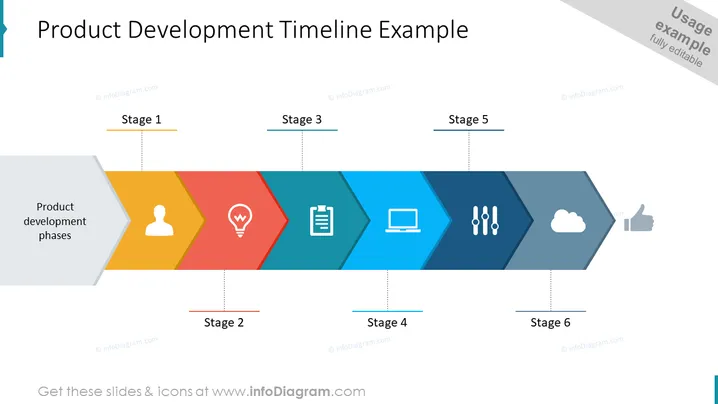
Product Development Timeline Example
Slide Content
The slide represents a timeline for product development, segmented into six stages. Each stage features a distinct color and an icon representing a phase of the product development process: "Stage 1" shows a figure for team or user, "Stage 2" incorporates a light bulb for an idea, "Stage 3" includes a clipboard symbolizing planning, "Stage 4" presents a computer for execution or development, "Stage 5" displays two vertical sliders for testing or refinement, and "Stage 6" shows a cloud for deployment or launch. At the beginning of the timeline, there is a label "Product development phases" indicating the main theme of the timeline.
Graphical Look
- The slide features a horizontal timeline with a series of connected, arrow-shaped chevrons in different colors.
- Each chevron has an icon centered within it, corresponding to the respective stage of product development.
- The colors palette ranges from light gray, yellow, red, teal, dark blue, to deep navy as the timeline progresses from stage 1 to stage 6.
- Above each arrow-shaped chevron, there are labels indicating each stage, numbered from "Stage 1" through "Stage 6."
- The timeline is displayed against a white background, with subtle gray lines connecting stage labels to the corresponding chevrons.
The overall appearance of the slide is modern and clean, utilizing a geometric design with a harmonious color progression to communicate the stages of product development clearly and effectively.
Use Cases
- To present the step-by-step process of a product's development lifecycle during business meetings or investor presentations.
- As a visual roadmap in project management meetings to discuss progress, next steps, or to assign tasks for each stage.
- For educational purposes to explain the phases of product development to students or new employees within a company.
- As part of a pitch deck to potential clients or partners, to showcase the company's structured approach to developing new products.
How to Edit
How to edit text & colors

How to expand / shorten diagram

How to Replace Icons in infoDiagram PPT


