
Reviews
Your graphics add a nice touch to my presentations and I recently used them for one of my all-hands meetings. Your toolbox adds professionalism to my slides. Instead of using standard clipart.
I needed a fresh look at some of my slides. I've tried to find a way to create a paintbrush effect, to underline, accentuate, add some color and the handwritten markers were just the things. Very easy to use, easy to size, change the color. It was an affordable, perfect solution and I'm happy to recommend it.
The crisp, clean look of the graphics, and the fact that it allowed me to easily edit and change the colors to match the template was my main reason for purchasing them.
Description
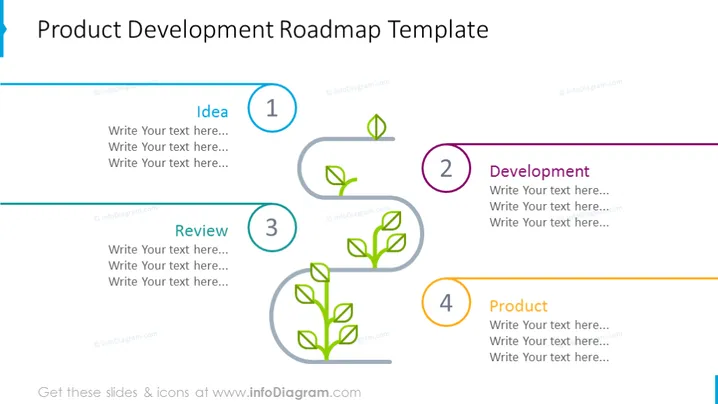
Product Development Roadmap Template
Slide Content
The slide is titled "Product Development Roadmap Template" and contains four key stages of product development with placeholders for additional text. The stages are presented as follows: 1) Idea - This section is likely for presenting initial concepts and brainstorming outcomes; 2) Development - Here, the emphasis is on the design, engineering, and creation process; 3) Review - This part is focused on evaluating and refining the product; 4) Product - The final stage is intended for the ready-to-launch product.
Graphical Look
- The slide background is white, giving it a clean, professional look.
- A large title is positioned at the top in dark blue font, standing out against the background.
- Four horizontal phases are depicted by colored circles numbered from 1 to 4 each associated with a stage (Idea, Development, Review, Product).
- Each stage has three lines of placeholder text in grey font for descriptive content.
- The circles are interconnected by a colored line that progresses in stages to indicate the flow of the roadmap.
- Each circle has a small plant-like icon inside, suggesting growth, with the icon progressively growing more leaves from stages 1 to 4.
- Color coding for each phase: blue for Idea, purple for Development, teal for Review, and oran
The slide has a minimalist and modern design with a clear visual progression. The use of color-coding and plant growth icons effectively communicates the concept of development and progression.
Use Cases
- Presenting a company's product development process to stakeholders or team members.
- As a visual aid in project status update meetings to show progress on various product development stages.
- In investor pitches to outline the planned development milestones for a new product.
- For educational purposes, to teach about the process of product development in a business or marketing course.
How to Edit
How to edit text & colors

How to expand / shorten diagram

How to Replace Icons in infoDiagram PPT


