
Reviews
Your graphics add a nice touch to my presentations and I recently used them for one of my all-hands meetings. Your toolbox adds professionalism to my slides. Instead of using standard clipart.
I needed a fresh look at some of my slides. I've tried to find a way to create a paintbrush effect, to underline, accentuate, add some color and the handwritten markers were just the things. Very easy to use, easy to size, change the color. It was an affordable, perfect solution and I'm happy to recommend it.
The crisp, clean look of the graphics, and the fact that it allowed me to easily edit and change the colors to match the template was my main reason for purchasing them.
Description
Product Defects & Quality Assurance KPIs Gauges
Slide Content
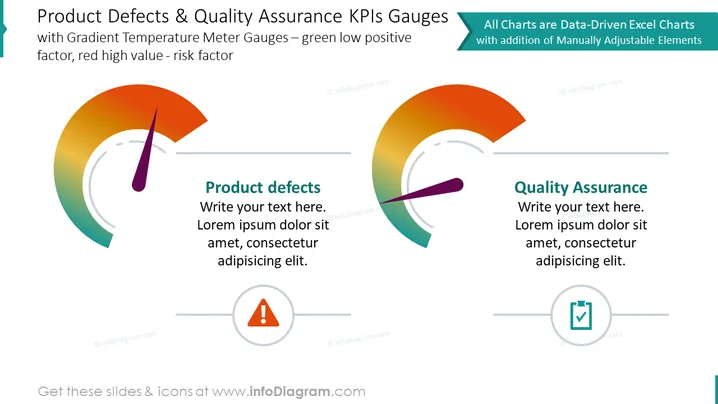
The PowerPoint slide titled 'Product Defects & Quality Assurance KPIs Gauges' features two main graphical elements which are gradient temperature meter gauges. These are used to represent key performance indicators (KPIs) with a color gradient that indicates positive factors in green and risk factors in red. There are two text boxes, one for each gauge, titled "Product defects" and "Quality Assurance" respectively; both have placeholder text where detailed descriptions can be added. The gauges serve as visual metaphors for monitoring performance levels where a shift towards green would indicate a favorable outcome and a move towards red would signify potential risks or issues.
Graphical Look
- Two semicircular gradient gauges, each with a needle pointing towards a color on the gauge to represent performance levels.
- Each gauge is accompanied by a text box with a title and placeholder text, suggesting where explanatory text can be added.
- A caution icon (exclamation mark inside a triangle) is associated with the "Product defects" gauge, and a checkmark inside a circle is paired with the "Quality Assurance" gauge.
- The slide background is white, which helps the colorful gauges and black text stand out.
- There are two headers above the gauges that are colored blue and green respectively, indicating that the gauges are related to data-driven statistics and can be customized.
The slide blends visual elements with text effectively, using color and position to guide the viewer's attention from the headers to the gauges and accompanying descriptions. The overall look is clean and professional, focusing on the gauges as central features to convey KPI-related data.
Use Cases
- To present a visual analysis of product quality and defect rates in business meetings focused on manufacturing or quality control.
- As part of a management dashboard in presentations to illustrate performance and target achievement in different areas of operations.
- Within training materials to educate staff on the importance and interpretation of KPIs in operational management and risk assessment.
- To communicate progress on quality improvement initiatives to stakeholders during regular review meetings or business strategy sessions.
How to Edit
How to edit text & colors

How to expand / shorten diagram

How to Replace Icons in infoDiagram PPT


