
Reviews
Your graphics add a nice touch to my presentations and I recently used them for one of my all-hands meetings. Your toolbox adds professionalism to my slides. Instead of using standard clipart.
I needed a fresh look at some of my slides. I've tried to find a way to create a paintbrush effect, to underline, accentuate, add some color and the handwritten markers were just the things. Very easy to use, easy to size, change the color. It was an affordable, perfect solution and I'm happy to recommend it.
The crisp, clean look of the graphics, and the fact that it allowed me to easily edit and change the colors to match the template was my main reason for purchasing them.
Description
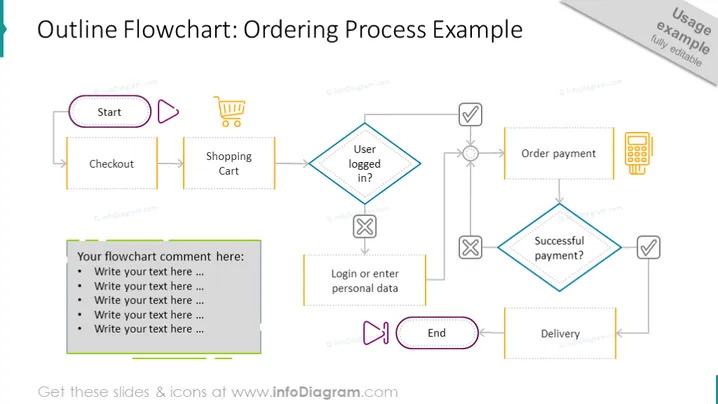
This professionally designed slide presents the ordering system flowchart example with start-to-end steps. The first step of the order process is checkout. The next step is the shopping cart, then seeing if the user is logged in. If yes - he orders the payment, if not - he logs in or enters personal data in order to proceed. If the payment is successful, the customer awaits the delivery of the product, if not - he tries to reorder until a successful purchase. This is a great PowerPoint presentation to explain the workflow management in your company, thanks to the editable flowchart diagram vector which describes the order process in a faster way. This slide is available to download and edit in PowerPoint, Google Slides, and Keynote.
##Slide Infographics: Rectangular Text Blocks, Rhomboid Text Blocks, Flat Button Icon, Shopping Cart Trolley Icon, Press Play Icon, Cross Icon, Check Mark Icon, Arrow Line Vector, Pause Play Button Icon, Payment Terminal Icon, Editable Graphics, Transparent Background
How to Edit
How to edit text & colors

How to expand / shorten diagram

How to Replace Icons in infoDiagram PPT


