
Reviews
Sus gráficos añaden un toque agradable a mis presentaciones y recientemente los usé para una de mis reuniones generales. Su conjunto de herramientas añade profesionalismo a mis diapositivas. En lugar de usar imágenes prediseñadas estándar.
Necesitaba un aspecto fresco para algunas de mis diapositivas. Había intentado encontrar una forma de crear un efecto de pincel, de subrayar, acentuar, añadir algo de color y los marcadores escritos a mano fueron justo lo que necesitaba. Muy fácil de usar, fácil de ajustar el tamaño, cambiar el color. Fue una solución asequible y perfecta, y estoy feliz de recomendarla.
El aspecto nítido y limpio de los gráficos, y el hecho de que me permitiera editar y cambiar fácilmente los colores para que coincidieran con la plantilla fue mi principal razón para comprarlos.
Description
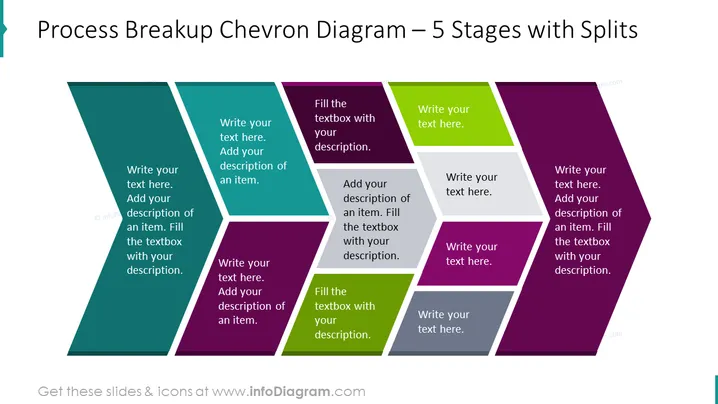
Process Breakup Chevron Diagram – 5 Stages with Splits
Slide Content
The PowerPoint slide titled "Process Breakup Chevron Diagram – 5 Stages with Splits" likely presents a method to diagrammatically break down a process into five distinct stages. Each chevron represents a step with space to add a description, indicating the user can customize the slide with specific information about each stage of the process—expressing sequence, progress, or chronological order.
Graphical Look
- The slide features a chevron diagram consisting of five adjacent, arrow-shaped elements that form a sequence from left to right.
- Each chevron is a different color: teal, blue, purple, green, and maroon, creating a visually distinct separation of stages.
- Every chevron contains two areas for text: a larger font size for the title and a smaller one for the description or details.
- The colors of the chevrons are gradient, giving depth and a 3D-like effect to the shapes.
- The overall visual structure is horizontal, emphasizing progression or flow.
The slide has a modern and clean appearance with a clear structure that facilitates visual guidance through the stages of a process.
Use Cases
- Presenting project timelines, where each chevron could represent a phase in the project development.
- Outlining a business process, with each stage representing a specific step in an operational workflow.
- Demonstrating product development stages, from ideation to market launch.
- Showcasing the flow of information or tasks through different departments in an organization.
How to Edit
How to edit text & colors

How to expand / shorten diagram

How to Replace Icons in infoDiagram PPT


