
Reviews
Ihre Grafiken verleihen meinen Präsentationen eine nette Note, und ich habe sie kürzlich für eines meiner All-Hands-Meetings verwendet. Ihre Toolbox verleiht meinen Folien Professionalität, anstatt Standard-Clipart zu verwenden.
Ich brauchte einen neuen Blick auf einige meiner Folien. Ich habe versucht, einen Weg zu finden, einen Pinselschlag-Effekt zu erzielen, um zu unterstreichen, hervorzuheben, Farbe hinzuzufügen, und die handgeschriebenen Markierungen waren genau das Richtige. Sehr einfach zu bedienen, leicht in der Größe zu ändern, die Farbe zu ändern. Es war eine erschwingliche, perfekte Lösung und ich empfehle sie gerne weiter.
Die klare, saubere Optik der Grafiken und die Tatsache, dass ich die Farben leicht bearbeiten und an die Vorlage anpassen konnte, war mein Hauptgrund für den Kauf.
Description
Presentation Table of Content
Plain Text with Picture Template
Slide Content
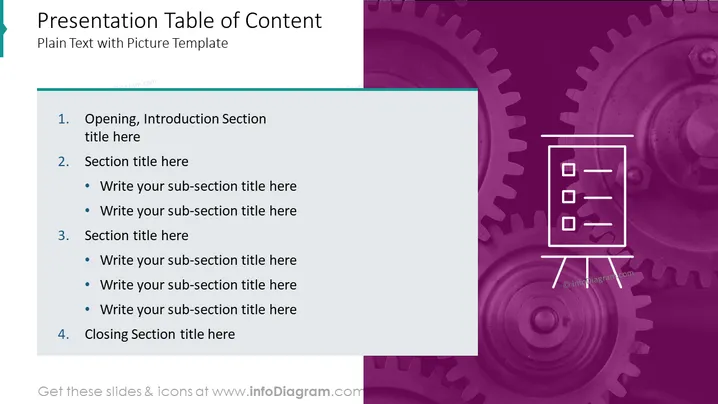
The slide is titled "Presentation Table of Content" and serves as a plain text template for creating a table of contents in a presentation. It outlines four main sections: "Opening, Introduction Section," "Section title here," "Section title here," and "Closing Section title here." Each of the middle sections allows for the addition of sub-section titles, indicating a customizable structure for an organized and detailed presentation layout.
Graphical Look
- The slide background features a split design with white on the left and a purple textured pattern, resembling gears or mechanical parts, on the right.
- A teal, ribbon-like shape slightly overlaps the top left corner of the slide.
- The main content is arranged in a list format using large, bold numerals followed by titles and bullet points for sub-sections, emphasizing hierarchy and organization.
- An outline illustration of a notepad on a stand is located on the right side of the slide, symbolizing the organization, planning, or listing of ideas.
- The color scheme comprises a dominant purple hue with white text and icons, and a pop of teal from the decorative shape at the top left corner, creating a professional and modern aesthetic.
The overall look of the slide is sleek and corporate, with a clear division between text and graphical elements. The use of gears as a background pattern could metaphorically suggest processes, precision, or interconnectivity within the context of the presentation's content.
Use Cases
- Outlining the key sections of a business strategy presentation to provide a roadmap for the audience.
- Organizing the main topics to be discussed during a product launch or project kick-off meeting.
- Setting the agenda for a training session or workshop to guide participants through the planned material.
- Summarizing the chapters of a lengthy corporate report in visual form during an executive summary or board meeting.
How to Edit
How to edit text & colors

How to expand / shorten diagram

How to Replace Icons in infoDiagram PPT


