
Reviews
Your graphics add a nice touch to my presentations and I recently used them for one of my all-hands meetings. Your toolbox adds professionalism to my slides. Instead of using standard clipart.
I needed a fresh look at some of my slides. I've tried to find a way to create a paintbrush effect, to underline, accentuate, add some color and the handwritten markers were just the things. Very easy to use, easy to size, change the color. It was an affordable, perfect solution and I'm happy to recommend it.
The crisp, clean look of the graphics, and the fact that it allowed me to easily edit and change the colors to match the template was my main reason for purchasing them.
Description
Practical Company Actions Template
Slide Content
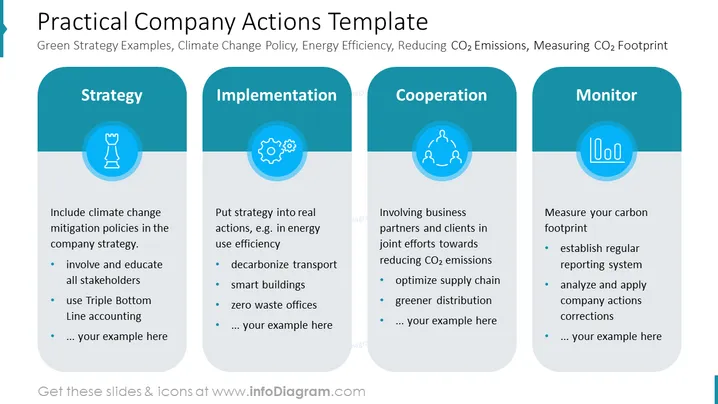
The slide titled "Practical Company Actions Template" outlines a four-step approach for businesses to address environmental concerns. It describes strategy development to include climate change mitigation, implementation through practical actions like improving energy efficiency, cooperation with business partners to reduce CO2 emissions, and monitoring to measure carbon footprints. Each step is explained with bullet points, highlighting key initiatives and leaving space for customized examples.
Graphical Look
- The slide uses a color scheme of different shades of blue and light blue background.
- Four rounded rectangular shapes are arranged horizontally across the slide, each containing a title and an icon at the top, followed by bulleted text.
- The icons within circles represent different themes: a chess piece for "Strategy," gears for "Implementation," linking people for "Cooperation," and a gauge for "Monitor."
- The titles of each category are written in capitalized, bold white font, which contrasts with the darker blue background of the rectangles.
- The bulleted lists use a smaller, non-bold font to describe each category, with a lighter blue for the bullet points.
- There's a place-holder text in italic saying "... your example here" under each list indicating where to add additional custom content.
The slide has a sleek and professional look with uniformity in design for each category, making the information clear and easy to read.
Use Cases
- Presenting a company's environmental strategy and policies to stakeholders or during annual meetings.
- Providing a framework for sustainability workshops to help teams identify and integrate green practices into their workflow.
- Showcasing a company's environmental initiatives in corporate social responsibility sections of reports or on the company website.
- Using as a template for educational presentations on corporate sustainability and environmental impact reduction.
How to Edit
How to edit text & colors

How to expand / shorten diagram

How to Replace Icons in infoDiagram PPT


