
Reviews
Sus gráficos añaden un toque agradable a mis presentaciones y recientemente los usé para una de mis reuniones generales. Su conjunto de herramientas añade profesionalismo a mis diapositivas. En lugar de usar imágenes prediseñadas estándar.
Necesitaba un aspecto fresco para algunas de mis diapositivas. Había intentado encontrar una forma de crear un efecto de pincel, de subrayar, acentuar, añadir algo de color y los marcadores escritos a mano fueron justo lo que necesitaba. Muy fácil de usar, fácil de ajustar el tamaño, cambiar el color. Fue una solución asequible y perfecta, y estoy feliz de recomendarla.
El aspecto nítido y limpio de los gráficos, y el hecho de que me permitiera editar y cambiar fácilmente los colores para que coincidieran con la plantilla fue mi principal razón para comprarlos.
Description
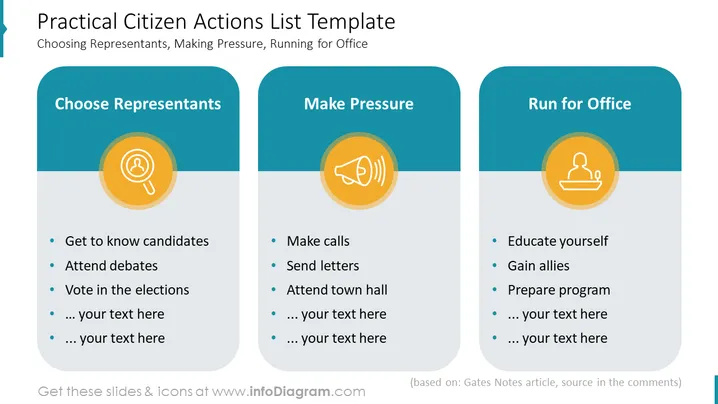
Practical Citizen Actions List Template
Slide Content
The slide titled "Practical Citizen Actions List Template" outlines actions that citizens can take to be involved in political processes. It is divided into three sections: "Choose Representants," "Make Pressure," and "Run for Office." These represent steps that individuals can take to understand their political system better, influence it, and participate directly. For example, 'Get to know candidates' means becoming familiar with the political stances and backgrounds of those running for office.
Graphical Look
- The background is a soft, light blue gradient.
- Three rounded rectangle containers, each with a darker blue header, are aligned horizontally across the slide.
- Each container houses a central icon circled in yellow-orange with a gradient background, above a list of actions in bullet points.
- The first icon depicts a magnifying glass symbolizing searching or scrutinizing, related to "Choose Representants."
- The second icon is a megaphone, representing advocacy or making one's voice heard in the context of "Make Pressure."
- The third icon features a figure at a podium, indicating leadership or campaigning, associated with "Run for Office."
- A dark gray footer with a note indicating the source.
The overall look of the slide is modern and clean, with the use of icons and contrasting colors to highlight different categories. The design is simple, which aids in conveying the message clearly and effectively.
Use Cases
- For educational presentations about civic engagement and responsibilities.
- During campaign training sessions, outlining steps for volunteers or staff.
- In workshops aimed at community organizations to foster political participation.
- In seminars or webinars discussing citizen's influence in democratic processes.
How to Edit
How to edit text & colors

How to expand / shorten diagram

How to Replace Icons in infoDiagram PPT


