
Reviews
Your graphics add a nice touch to my presentations and I recently used them for one of my all-hands meetings. Your toolbox adds professionalism to my slides. Instead of using standard clipart.
I needed a fresh look at some of my slides. I've tried to find a way to create a paintbrush effect, to underline, accentuate, add some color and the handwritten markers were just the things. Very easy to use, easy to size, change the color. It was an affordable, perfect solution and I'm happy to recommend it.
The crisp, clean look of the graphics, and the fact that it allowed me to easily edit and change the colors to match the template was my main reason for purchasing them.
Description
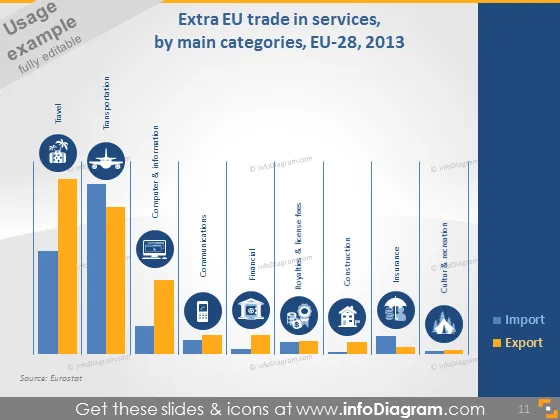
Extra EU trade in services, by main categories, EU-28, 2013
Slide Content
The slide is titled "Extra EU trade in services, by main categories, EU-28, 2013" and showcases a bar chart juxtaposing import and export figures across eight service categories: Travel, Computer & Information, Communications, Financial, Royalties & License Fees, Other Business Services, Construction, and Culture & Recreation. Travel and Other Business Services seem to have the highest bars, indicating these categories might have the largest volume in trade, while Culture & Recreation and Construction have the lowest, suggesting lesser trade volumes.
Graphical Look
- The title is in a large, bold font at the top of the slide.
- There is a blue, horizontal bar chart centered on the slide with bars in two different colors.
- Orange bars represent 'Import' and blue bars represent 'Export'.
- Each pair of bars is labeled with a service category underneath, using a mix of icons and text.
- Icons associated with each category, such as an airplane for Travel and a computer for Computer & Information, are placed above the category labels.
- Source attribution is given at the bottom left in a smaller font.
- The slide background fades from dark blue at the top to a lighter blue at the bottom.
The overall look of the slide is professional and clean, with a good use of color contrast to differentiate between imports and exports. The use of relevant icons adds a visual cue to swiftly identify the service categories.
Use Cases
- Presenting trade balance overviews in economic reports or presentations.
- Providing visual insights into service sector performance to stakeholders during business meetings.
- Utilizing during academic lectures or seminars to illustrate trade in services data.
- Preparing comprehensive market analysis for strategists and investors.
How to Edit
How to edit text & colors

How to expand / shorten diagram

How to Replace Icons in infoDiagram PPT


