
Reviews
Sus gráficos añaden un toque agradable a mis presentaciones y recientemente los usé para una de mis reuniones generales. Su conjunto de herramientas añade profesionalismo a mis diapositivas. En lugar de usar imágenes prediseñadas estándar.
Necesitaba un aspecto fresco para algunas de mis diapositivas. Había intentado encontrar una forma de crear un efecto de pincel, de subrayar, acentuar, añadir algo de color y los marcadores escritos a mano fueron justo lo que necesitaba. Muy fácil de usar, fácil de ajustar el tamaño, cambiar el color. Fue una solución asequible y perfecta, y estoy feliz de recomendarla.
El aspecto nítido y limpio de los gráficos, y el hecho de que me permitiera editar y cambiar fácilmente los colores para que coincidieran con la plantilla fue mi principal razón para comprarlos.
Description
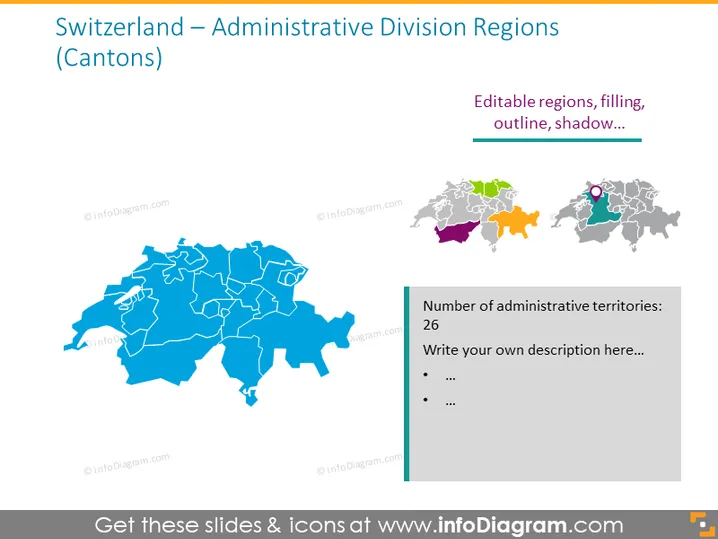
Switzerland – Administrative Division Regions (Cantons)
Slide Content
The slide presents the administrative division of Switzerland into cantons. There's a large map of Switzerland showing the individual cantons, with each depicted in a uniform color and demarcated by white lines. A smaller set of maps to the right illustrates options for customization, such as color filling, and outlines, and even indicates that shadow effects can be applied. This suggests that the maps are editable. Additionally, there is a side text box with the title "Number of administrative territories: 26" and it provides space to write descriptions or details, implying that Switzerland is divided into 26 cantons.
Graphical Look
- A large map of Switzerland dominates the slide, showcasing various cantons.
- Each canton is separated by white borders, allowing for clear distinction.
- A smaller collection of Switzerland maps on the right side provides examples of different styling options.
- A sidebar next to these maps contains text indicating the total number of cantons and a placeholder for additional descriptions.
- The furnishing of the slide is minimal, with an emphasis on the maps themselves.
The slide features a professional look, with a large, clear map allowing immediate understanding of the subject matter. The additional smaller maps with styling options demonstrate the editable nature of the graphic, providing a functional design element.
Use Cases
- Data presentation for geography-related topics, highlighting Switzerland's administrative regions.
- Educational settings where a visual representation of Switzerland’s cantons aids teaching.
- Business meetings that discuss market segmentation, operations, or logistics within Switzerland.
- Customization of the maps in the slide can be used to highlight specific areas for tourism or regional analysis.
How to Edit
How to edit text & colors

How to expand / shorten diagram

How to Replace Icons in infoDiagram PPT


