
Reviews
Ihre Grafiken verleihen meinen Präsentationen eine nette Note, und ich habe sie kürzlich für eines meiner All-Hands-Meetings verwendet. Ihre Toolbox verleiht meinen Folien Professionalität, anstatt Standard-Clipart zu verwenden.
Ich brauchte einen neuen Blick auf einige meiner Folien. Ich habe versucht, einen Weg zu finden, einen Pinselschlag-Effekt zu erzielen, um zu unterstreichen, hervorzuheben, Farbe hinzuzufügen, und die handgeschriebenen Markierungen waren genau das Richtige. Sehr einfach zu bedienen, leicht in der Größe zu ändern, die Farbe zu ändern. Es war eine erschwingliche, perfekte Lösung und ich empfehle sie gerne weiter.
Die klare, saubere Optik der Grafiken und die Tatsache, dass ich die Farben leicht bearbeiten und an die Vorlage anpassen konnte, war mein Hauptgrund für den Kauf.
Description
Company Operating Profit Margin Gauge Chart
Slide Content
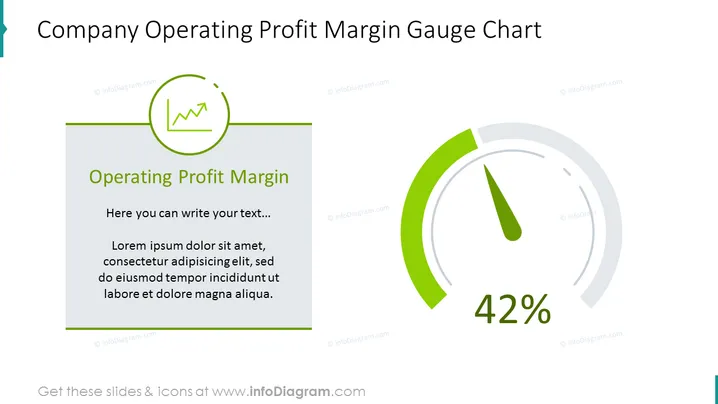
The slide presents a "Company Operating Profit Margin Gauge Chart" showcasing a specific performance metric, presumably the operating profit margin, represented at 42%. The title explicitly indicates the focus on financial analytics, and the gauge style chart provides a visual indication of performance level, often likened to a speedometer in a vehicle, indicating how close the organization is to its desired performance target. There's placeholder text for additional information or context about the metric, which can be substituted with real data or insights relevant to the presentation.
Graphical Look
- The slide's background is white, maintaining a clean and professional look.
- The title of the slide is prominently featured in large, bold, dark text at the top.
- A stylized line chart icon in a green circular outline is placed next to the title, symbolizing growth or financial trends.
- On the left side, there's a text box with a green border accent on the top left corner, containing a subheading "Operating Profit Margin" in bold and two levels of grey placeholder text underneath.
- To the right is a large gauge chart with a dark grey outline and a green accent indicating the measured value, displaying "42%" in large, black, bold font within the gauge.
- The gauge chart uses shades of green to highlight the active portion and grey for the inactive area, with a needle pointing to the current value.
The overall look of the slide is modern, with a minimalistic style that employs color effectively to draw attention to key elements, such as the performance metric and the title.
Use Cases
- Presenting financial results or key performance indicators (KPIs) during corporate meetings.
- Visualizing target achievements or goals in investor presentations or shareholder reports.
- Comparing projected versus actual performance metrics in strategy sessions.
- Enhancing regular financial updates with visual elements for clarity and engagement during team or department meetings.
How to Edit
How to edit text & colors

How to expand / shorten diagram

How to Replace Icons in infoDiagram PPT


