

Your graphics add a nice touch to my presentations and I recently used them for one of my all-hands meetings. Your toolbox adds professionalism to my slides. Instead of using standard clipart.
Claude Jones, Director of Engineer, @Walmartlabs, USA

Your graphics add a nice touch to my presentations and I recently used them for one of my all-hands meetings. Your toolbox adds professionalism to my slides. Instead of using standard clipart.
Claude Jones, Director of Engineer, @Walmartlabs, USA
I needed a fresh look at some of my slides. I've tried to find a way to create a paintbrush effect, to underline, accentuate, add some color and the handwritten markers were just the things. Very easy to use, easy to size, change the color. It was an affordable, perfect solution and I'm happy to recommend it.
Anonymous, US
The crisp, clean look of the graphics, and the fact that it allowed me to easily edit and change the colors to match the template was my main reason for purchasing them.
Brandie Jenkins, E-learning Developer, USA
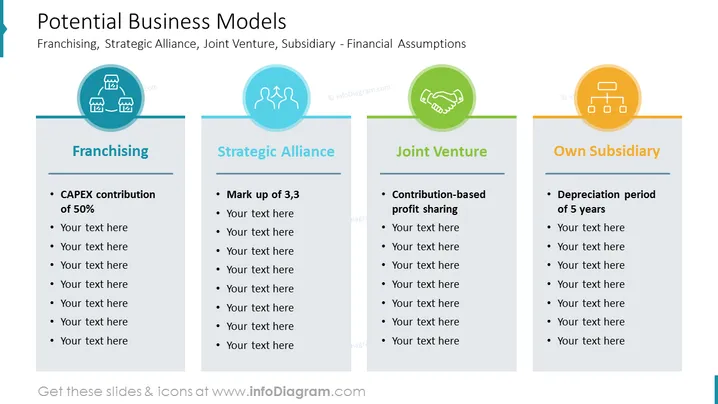
The slide is titled "Potential Business Models" and discusses different types of collaborative business structures, such as Franchising, Strategic Alliance, Joint Venture, and Owning a Subsidiary. Franchising is explained with "CAPEX contribution of 50%" which likely pertains to the initial capital expenditure required by the franchisee. Strategic Alliance is characterized by a "Mark up of 3,3," hinting at a pricing strategy that sets a product price based on cost. Joint Ventures are noted for "Contribution-based profit sharing," indicating a financial arrangement where profits are distributed according to each party's contribution. Finally, the Own Subsidiary model mentions a "Depreciation period of 5 years," referencing an accounting method where the value of a fixed asset is reduced over time.
The slide has a clean, professional design with a balanced layout. The use of color-coding and icons aids quick recognition of each business model concept.



