

Your graphics add a nice touch to my presentations and I recently used them for one of my all-hands meetings. Your toolbox adds professionalism to my slides. Instead of using standard clipart.
Claude Jones, Director of Engineer, @Walmartlabs, USA

Your graphics add a nice touch to my presentations and I recently used them for one of my all-hands meetings. Your toolbox adds professionalism to my slides. Instead of using standard clipart.
Claude Jones, Director of Engineer, @Walmartlabs, USA
I needed a fresh look at some of my slides. I've tried to find a way to create a paintbrush effect, to underline, accentuate, add some color and the handwritten markers were just the things. Very easy to use, easy to size, change the color. It was an affordable, perfect solution and I'm happy to recommend it.
Anonymous, US
The crisp, clean look of the graphics, and the fact that it allowed me to easily edit and change the colors to match the template was my main reason for purchasing them.
Brandie Jenkins, E-learning Developer, USA
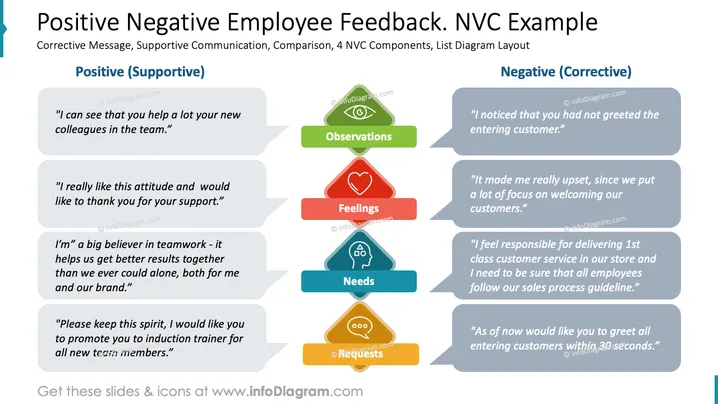
The slide compares positive and negative employee feedback using Nonviolent Communication (NVC) examples. It provides supportive and corrective messages divided into four components: Observations, Feelings, Needs, and Requests. Observations indicate what was noticed, Feelings express emotional impact, Needs reveal underlying requirements, and Requests propose future actions. It illustrates delivering feedback constructively or critically by highlighting supportive vs. corrective approaches.
The overall look is organized, clear, and balanced, facilitating an easy comparison between supportive and corrective feedback using distinct colors and structured layout.



