
Reviews
Your graphics add a nice touch to my presentations and I recently used them for one of my all-hands meetings. Your toolbox adds professionalism to my slides. Instead of using standard clipart.
I needed a fresh look at some of my slides. I've tried to find a way to create a paintbrush effect, to underline, accentuate, add some color and the handwritten markers were just the things. Very easy to use, easy to size, change the color. It was an affordable, perfect solution and I'm happy to recommend it.
The crisp, clean look of the graphics, and the fact that it allowed me to easily edit and change the colors to match the template was my main reason for purchasing them.
Description
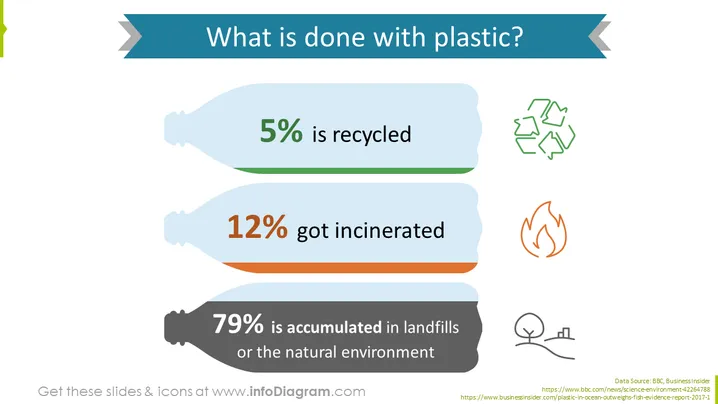
##Slide contents: The Plastic Waste Management PowerPoint Template shows the amount of plastic recycled in the environment. Only 5% of plastic is recycled, and 12% gets incinerated. Unfortunately, 79% of plastic consumption gets thrown away and is accumulated in landfills and the natural environment. You can use this PPT slide if you want to educate your company on the danger of plastic pollution. You can start your presentation by explaining what is done to plastic after its disposal, and then offer some solutions to decrease plastic waste in the ocean and environment. You can explain that plastic generates greenhouse gas emissions that lead to global warming. If your company uses plastic packaging, a solution might be to replace plastic with more sustainable and environmentally friendly packaging. This small initiative will have a positive impact on the environment and will decrease plastic production. You can also offer waste management systems such as reducing, reusing, and recycling plastic. You can download this slide in HQ and Google Slides. ##Slide Infographic Description: White Background, Ribbon Icon, Plastic Bottle Icon, Arrows Icon, Fire Icon, Incineration Icon, Nature Icon, Tree Icon
How to Edit
How to edit text & colors

How to expand / shorten diagram

How to Replace Icons in infoDiagram PPT


