
Reviews
Sus gráficos añaden un toque agradable a mis presentaciones y recientemente los usé para una de mis reuniones generales. Su conjunto de herramientas añade profesionalismo a mis diapositivas. En lugar de usar imágenes prediseñadas estándar.
Necesitaba un aspecto fresco para algunas de mis diapositivas. Había intentado encontrar una forma de crear un efecto de pincel, de subrayar, acentuar, añadir algo de color y los marcadores escritos a mano fueron justo lo que necesitaba. Muy fácil de usar, fácil de ajustar el tamaño, cambiar el color. Fue una solución asequible y perfecta, y estoy feliz de recomendarla.
El aspecto nítido y limpio de los gráficos, y el hecho de que me permitiera editar y cambiar fácilmente los colores para que coincidieran con la plantilla fue mi principal razón para comprarlos.
Description
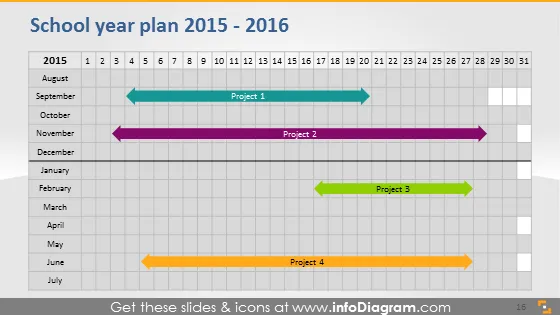
School year plan 2015 - 2016
Slide Content
The slide represents a timeline for the school year plan of 2015 - 2016, structured as a horizontal bar chart over a 12-month calendar. It includes "Project 1" happening between August and September, "Project 2" in October, "Project 3" spanning January and February, and "Project 4" in June. These projects likely represent major activities or milestones in the academic schedule, with their positions and lengths indicating when they start and their durations.
Graphical Look
- The slide title is in a bold, dark font at the top.
- A horizontal axis representing months from August to July is placed at the top.
- Below the month labels, there is a series of numbers from 1 to 31 representing days of the month.
- Four horizontal bars in different colors represent individual projects across the timeline.
- Each project bar has a label, e.g., "Project 1", center-aligned on the bars.
- Project arrows pointing from left to right indicate the timespan and progression of the projects.
- The entire chart grid is laid over a light grey background.
- The slide background is white with a slight shadow effect around the main content area.
The slides have a clean and simple design conducive to easy comprehension of the academic schedule. The use of different colors enables quick differentiation between projects.
Use Cases
- Presenting an academic schedule or yearly planning in staff meetings.
- Outlining the sequence and duration of major school events for administrative purposes.
- Communicating important academic dates to students or parents.
- Reviewing and planning resource allocation for different times of the school year.
How to Edit
How to edit text & colors

How to expand / shorten diagram

How to Replace Icons in infoDiagram PPT


