
Reviews
Sus gráficos añaden un toque agradable a mis presentaciones y recientemente los usé para una de mis reuniones generales. Su conjunto de herramientas añade profesionalismo a mis diapositivas. En lugar de usar imágenes prediseñadas estándar.
Necesitaba un aspecto fresco para algunas de mis diapositivas. Había intentado encontrar una forma de crear un efecto de pincel, de subrayar, acentuar, añadir algo de color y los marcadores escritos a mano fueron justo lo que necesitaba. Muy fácil de usar, fácil de ajustar el tamaño, cambiar el color. Fue una solución asequible y perfecta, y estoy feliz de recomendarla.
El aspecto nítido y limpio de los gráficos, y el hecho de que me permitiera editar y cambiar fácilmente los colores para que coincidieran con la plantilla fue mi principal razón para comprarlos.
Description
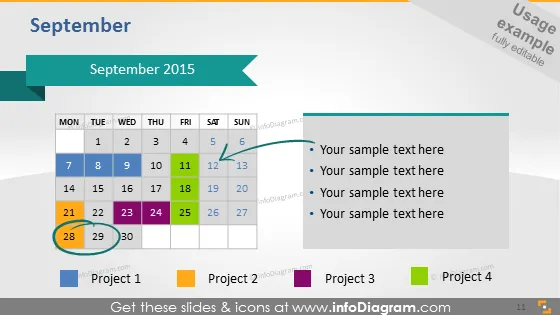
September 2015
Slide Content
The slide is titled "September 2015" and appears to be a calendar-based project timeline. It presents a September month calendar with dates and days, highlighting four projects with different colors on specific dates: Project 1 in pink, Project 2 in orange, Project 3 in purple, and Project 4 in blue. Next to the calendar on the right side, there are colored bullet points corresponding to the project colors on the calendar, followed by placeholder text "Your sample text here", indicating where further information or descriptions for each project can be added.
Graphical Look
- The slide background is a gradient of grey to white from left to right.
- A calendar occupies the left-hand side of the slide, with the days Monday to Sunday listed at the top and dates beneath them in grid format.
- The date numbers are black with grey grid cells, while weekends are highlighted in lighter grey.
- Four project markers (pink, orange, purple, blue) are scattered across the calendar dates.
- A banner-like shape at the top contains the title "September 2015" in white against a turquoise background.
- To the right, a set of four colored circles corresponds to the project markers on the calendar.
- Each circle is followed by a line of text, "Your sample text here".
The slide has a clean, professional design with a straightforward layout that balances the visual elements of color-coded projects on a calendar grid with textual information on the right.
Use Cases
- To display project timelines during a business presentation, indicating key dates and milestones.
- For monthly planning meetings to give a visual representation of when different projects are scheduled.
- In status update meetings to illustrate progress on various projects throughout a particular month.
- As a visual aid in project management workshops to teach the importance of time tracking and deadline visualization.
How to Edit
How to edit text & colors

How to expand / shorten diagram

How to Replace Icons in infoDiagram PPT


