
Reviews
Your graphics add a nice touch to my presentations and I recently used them for one of my all-hands meetings. Your toolbox adds professionalism to my slides. Instead of using standard clipart.
I needed a fresh look at some of my slides. I've tried to find a way to create a paintbrush effect, to underline, accentuate, add some color and the handwritten markers were just the things. Very easy to use, easy to size, change the color. It was an affordable, perfect solution and I'm happy to recommend it.
The crisp, clean look of the graphics, and the fact that it allowed me to easily edit and change the colors to match the template was my main reason for purchasing them.
Description
Plan Timeline with Yearly Activities on Seasonal Market
Slide Content
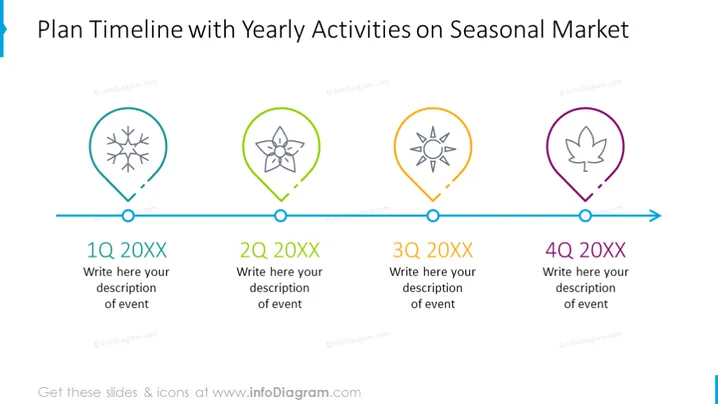
The PowerPoint slide "Plan Timeline with Yearly Activities on Seasonal Market" breaks down a timeline into four quarters, indicating different seasonal activities. 1Q 20XX corresponds with a snowflake symbol, suggesting a winter event. 2Q 20XX shows a flower icon, hinting at springtime activities. 3Q 20XX includes a sun graphic, which likely represents summer. And 4Q 20XX features a leaf emblem, pointing to autumn events. Each quarter allows space for a custom description of events, demonstrating the seasonal nature of the planned activities.
Graphical Look
- A horizontal timeline runs across the middle of the slide with a blue arrow at the end, indicating forward progression.
- Four distinct icons along the timeline, each within a differently colored teardrop-shaped marker - blue for winter, green for spring, orange for summer, and purple for autumn.
- Each seasonal marker is connected to a circular node on the timeline by a small line.
- Text boxes below each quarterly marker provide a space for event descriptions, reading "Write here your description of event".
- Bold, capitalized text "1Q 20XX", "2Q 20XX", "3Q 20XX", and "4Q 20XX" label the timeline below the icons, referring to the first, second, third, and fourth quarters of a year, respectively.
The slide features a clean and professional design with a color-coded system to visually segregate the quarters of the year. The icons are simple yet informative, corresponding to their respective seasonal activity.
Use Cases
- Presenting a company's marketing or sales strategy that changes with the seasons.
- Outlining the timeline of a project that has different phases or milestones throughout a year.
- Showcasing seasonal product launches or promotional campaigns in a retail or service environment.
- Tracking seasonal trends and their impact on planning in industries such as agriculture or tourism.
How to Edit
How to edit text & colors

How to expand / shorten diagram

How to Replace Icons in infoDiagram PPT


