
Reviews
Ihre Grafiken verleihen meinen Präsentationen eine nette Note, und ich habe sie kürzlich für eines meiner All-Hands-Meetings verwendet. Ihre Toolbox verleiht meinen Folien Professionalität, anstatt Standard-Clipart zu verwenden.
Ich brauchte einen neuen Blick auf einige meiner Folien. Ich habe versucht, einen Weg zu finden, einen Pinselschlag-Effekt zu erzielen, um zu unterstreichen, hervorzuheben, Farbe hinzuzufügen, und die handgeschriebenen Markierungen waren genau das Richtige. Sehr einfach zu bedienen, leicht in der Größe zu ändern, die Farbe zu ändern. Es war eine erschwingliche, perfekte Lösung und ich empfehle sie gerne weiter.
Die klare, saubere Optik der Grafiken und die Tatsache, dass ich die Farben leicht bearbeiten und an die Vorlage anpassen konnte, war mein Hauptgrund für den Kauf.
Description
6 LEVEL FUNNEL
Slide Content
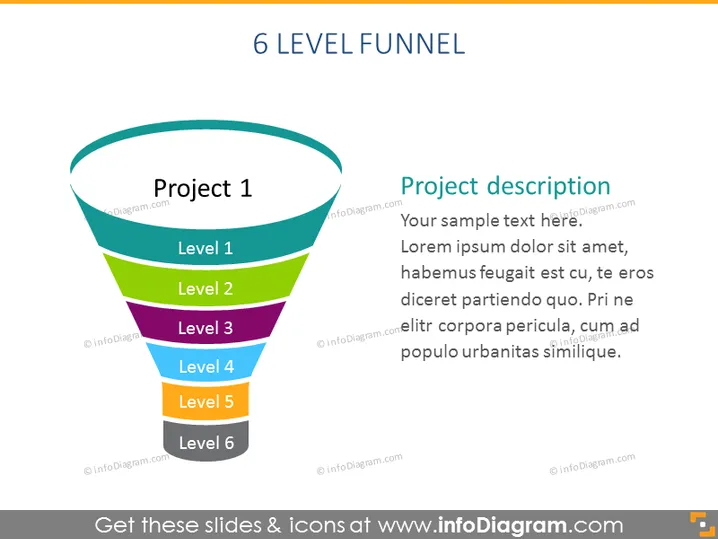
The PowerPoint slide titled "6 LEVEL FUNNEL" represents a project's breakdown into six stages, utilizing the funnel metaphor to structure the levels of progress or filtering of information/concepts. "Project 1" is signified as the starting point, with each subsequent level (Levels 1 to 6) indicating a more refined or advanced stage of the project or process. The description area on the right provides a placeholder for a comprehensive explanation of "Project description," detailed with generic filler text.
Graphical Look
- A large, centered funnel graphic with six distinct colored segments, each labeled from "Project 1" down to "Level 6."
- Bold, all-caps title "6 LEVEL FUNNEL" at the top of the slide, left-aligned above the funnel graphic.
- Text box adjacent to the funnel on the right, titled "Project description" with placeholder text below it.
- Horizontal lines separate the different levels within the funnel, assisting in distinguishing the stages.
- Shades of blue, green, purple, and orange are used to colorize the levels in the funnel, creating a visual hierarchy.
The slide features a clean and professional design with a prominent funnel graphic that effectively communicates the concept of progression through levels. The use of different colors aids in distinguishing between the separate stages of the funnel.
Use Cases
- Presenting sales or marketing conversion processes in a business presentation, where each level represents a stage in the customer journey.
- Demonstrating project management stages from initiation to closure in project overview presentations.
- Explaining the filtering process in decision-making or data analysis discussions.
- Illustrating the stages of a product development lifecycle for both internal team briefings and external stakeholder updates.
How to Edit
How to edit text & colors

How to expand / shorten diagram

How to Replace Icons in infoDiagram PPT


