
Reviews
Your graphics add a nice touch to my presentations and I recently used them for one of my all-hands meetings. Your toolbox adds professionalism to my slides. Instead of using standard clipart.
I needed a fresh look at some of my slides. I've tried to find a way to create a paintbrush effect, to underline, accentuate, add some color and the handwritten markers were just the things. Very easy to use, easy to size, change the color. It was an affordable, perfect solution and I'm happy to recommend it.
The crisp, clean look of the graphics, and the fact that it allowed me to easily edit and change the colors to match the template was my main reason for purchasing them.
Description
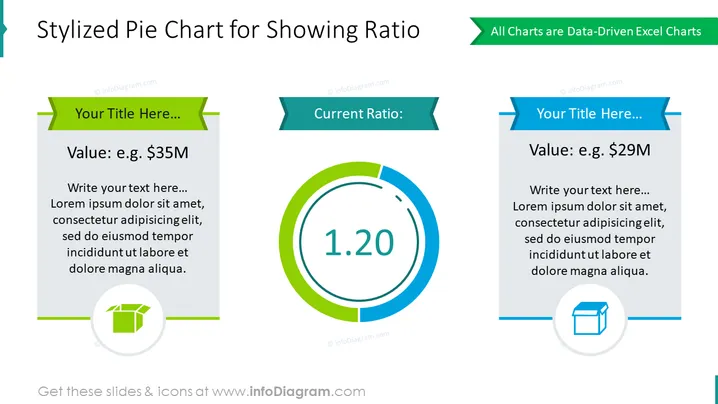
Stylized Pie Chart for Showing Ratio
Slide Content
This PowerPoint slide presents a visual comparison of two values using a stylized pie chart format to show a ratio. On the left, there is a placeholder for a value, exemplified as "$35M", with an accompanying explanatory text area. On the right, another value is suggested, "$29M", with similar space for elaboration. The centerpiece exhibits a large pie chart with "1.20" signifying the current ratio, providing a simple and immediate visual comparison of the two values, illustrating their proportional relationship.
Graphical Look
- Two main content blocks with header banners in green and blue, each containing a text placeholder with a title and a default monetary value.
- A central circular graphic represents a pie chart with the ratio "1.20" prominently displayed in the middle, contrasting in size with the two value blocks.
- Each content block is accompanied by a symbolic icon within a green circle at the bottom: the left block displays a package icon, while the right block shows a box icon.
- Both icons are similar in size and color, providing balance to the overall visual structure of the slide.
- A thin blue dividing line, horizontal across the slide, mirrors the circular shape of the central graphic, reinforcing the slide's symmetrical design.
The slide is characterized by a clean and symmetrical layout with a professional color scheme, focused on clarity and easy comparison of data. The use of bold numbers and text in the central pie chart graphic draws attention immediately to the key data point.
Use Cases
- Presenting financial comparisons, like budget allocations or departmental spending, in a business meeting.
- Illustrating key business metrics ratios such as profit margins or expense to revenue ratios in a boardroom presentation.
- Displaying market share comparison between two products in a sales strategy session.
- Summarizing financial results of two competing investment options in an investor relations communication.
How to Edit
How to edit text & colors

How to expand / shorten diagram

How to Replace Icons in infoDiagram PPT


