
Reviews
Vos graphiques ajoutent une belle touche à mes présentations et je les ai récemment utilisés pour l'une de mes réunions générales. Votre boîte à outils ajoute du professionnalisme à mes diapositives. Au lieu d'utiliser des cliparts standards.
J'avais besoin d'un nouveau regard sur certaines de mes diapositives. J'ai essayé de trouver un moyen de créer un effet de pinceau, de souligner, d'accentuer, d'ajouter de la couleur et les marqueurs manuscrits étaient exactement ce qu'il fallait. Très facile à utiliser, facile à ajuster la taille, à changer la couleur. C'était une solution abordable et parfaite et je suis heureux de la recommander.
L'aspect net et épuré des graphiques, et le fait qu'il m'ait permis d'éditer et de changer facilement les couleurs pour les adapter au modèle, ont été les principales raisons de mon achat.
Description
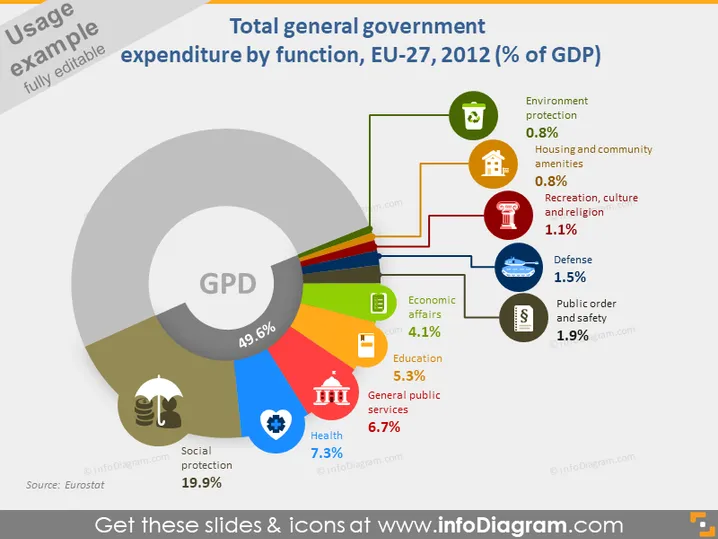
Total general government expenditure by function, EU-27, 2012 (% of GDP)
Slide Content
The slide presents a breakdown of the European Union's general government spending as a percentage of GDP by function for the year 2012. The largest share is Social protection at 19.9%, followed by General public services (6.7%), Health (7.3%), and Education (5.3%). Lesser amounts are spent on Economic affairs (4.1%), Public order and safety (1.9%), Defense (1.5%), Recreation, culture, and religion (1.1%), and the smallest on Housing and community amenities as well as Environment protection, both at 0.8%.
Graphical Look
- The main feature is a large, doughnut-shaped chart occupying the majority of the slide.
- Inside the doughnut chart, "GPD" is written in large letters with "49.6%" below it.
- The chart segments are color-coded and connected to text labels that float outside the chart with corresponding icons.
- Each segment represents a different governmental function, such as social protection or health, with varying sizes indicative of their proportion of total expenditure.
- The color palette is varied featuring greens, reds, blues, and other colors.
- The slide background is white, creating contrast with the colorful chart and text elements.
- There are light shadow effects on the graphical elements giving them a subtle 3D appearance.
- Icons representing the different functions are stylized and placed next to the corresponding labels—e.g., a house icon for Housing and a stethoscope for Health.
The overall look is professional with a clear focus on data representation. The use of color and icons makes the information easy to digest at a glance.
Use Cases
- To explain the breakdown of government spending in a financial report or budget presentation.
- To compare and discuss priorities in public spending during policy forums or educational seminars.
- To provide a visual snapshot of government expenditure in economics or social studies classes.
- To support discussions on fiscal policy and its impact on various sectors within public administration workshops or courses.
How to Edit
How to edit text & colors

How to expand / shorten diagram

How to Replace Icons in infoDiagram PPT


