
Reviews
Sus gráficos añaden un toque agradable a mis presentaciones y recientemente los usé para una de mis reuniones generales. Su conjunto de herramientas añade profesionalismo a mis diapositivas. En lugar de usar imágenes prediseñadas estándar.
Necesitaba un aspecto fresco para algunas de mis diapositivas. Había intentado encontrar una forma de crear un efecto de pincel, de subrayar, acentuar, añadir algo de color y los marcadores escritos a mano fueron justo lo que necesitaba. Muy fácil de usar, fácil de ajustar el tamaño, cambiar el color. Fue una solución asequible y perfecta, y estoy feliz de recomendarla.
El aspecto nítido y limpio de los gráficos, y el hecho de que me permitiera editar y cambiar fácilmente los colores para que coincidieran con la plantilla fue mi principal razón para comprarlos.
Description
Slide Title
The image does not contain a clear slide title, so I cannot provide one.
Slide Content
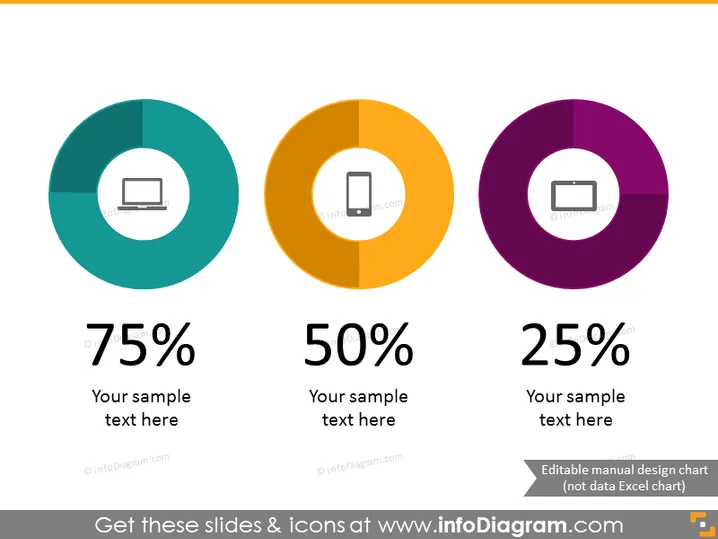
The PowerPoint slides showcase three donut charts each representing a different percentage – 75%, 50%, and 25%. Each chart is accompanied by a placeholder for text, suggesting that the percentages relate to different topics or categories that can be customized. The 75% chart has an icon of a laptop, indicating perhaps a tech-related statistic. The 50% with a mobile phone icon may represent mobile usage or market share. The 25% with a projector screen could relate to presentations or visual content share.
Graphical Look
- Three large donut charts, each in a different color: teal, orange, and purple.
- Inside each donut chart is a white icon: a laptop, a mobile phone, and a projector screen.
- Below each chart, there is a large percentage figure matching the color of the chart above it: 75%, 50%, and 25%.
- Underneath the percentage figures, there is placeholder text "Your sample text here" in gray.
- The overall color scheme is a complementary mix of cool and warm tones.
- The icons are simple and easily recognisable, correlating with the topics they represent.
The slide has a clean, modern look with a balanced layout that allows for easy comparison of the data presented in the donut charts. The contrasting colors and bold percentage figures help draw attention to key information.
Use Cases
- Presenting statistics on market share or user engagement across different platforms or products.
- Showing company data on revenue distribution among different departments or product categories.
- Aiding visual representation in reports on research findings pertaining to technology utilization.
- Displaying survey results or customer feedback percentages in management presentations.
How to Edit
How to edit text & colors

How to expand / shorten diagram

How to Replace Icons in infoDiagram PPT


