
Reviews
Sus gráficos añaden un toque agradable a mis presentaciones y recientemente los usé para una de mis reuniones generales. Su conjunto de herramientas añade profesionalismo a mis diapositivas. En lugar de usar imágenes prediseñadas estándar.
Necesitaba un aspecto fresco para algunas de mis diapositivas. Había intentado encontrar una forma de crear un efecto de pincel, de subrayar, acentuar, añadir algo de color y los marcadores escritos a mano fueron justo lo que necesitaba. Muy fácil de usar, fácil de ajustar el tamaño, cambiar el color. Fue una solución asequible y perfecta, y estoy feliz de recomendarla.
El aspecto nítido y limpio de los gráficos, y el hecho de que me permitiera editar y cambiar fácilmente los colores para que coincidieran con la plantilla fue mi principal razón para comprarlos.
Description
Physics Theme Infographics Template with 3 Elements
Slide Content
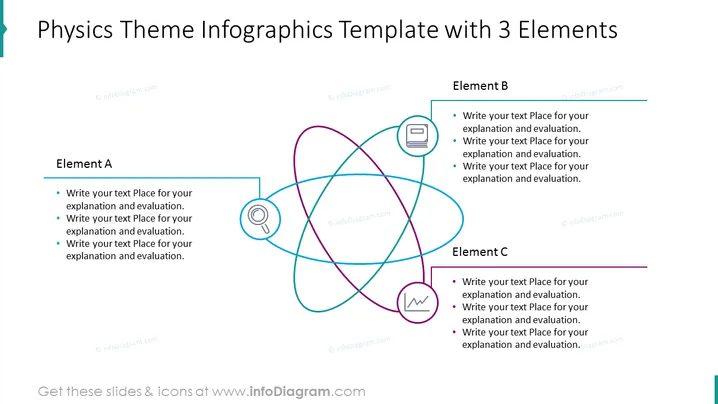
This PowerPoint slide titled "Physics Theme Infographics Template with 3 Elements" presents a framework for discussing three interconnected topics, labels them as Element A, B, and C, and each has space for detailed text input. Element A suggests a starting point for explanation and evaluation, similar to Elemental B and C, all inviting the presenter to add specific content. This format is typical for presenting multiple aspects of a theory, experiment, or concept that are linked or have overlapping areas of interest.
Graphical Look
- The slide background is white, providing a clean canvas for the content.
- The central graphic is composed of three interlocking loop shapes, each with a different color - blue, green, and pink, suggesting intertwined concepts or relationships.
- Each loop is linked to a rectangle that contains placeholders for text corresponding to an element (A, B, C); these rectangles also have colored borders matching their respective loops.
- Inside the loops, there are icons relevant to physics: a magnet (for Element A), a book (for Element B), and a waveform or oscillation symbol (for Element C), each with a light background and a colored outline.
- The slide title is prominently displayed at the top in a large, bold font.
- Three subheadings, "Element A," "Element B," and "Element C," are placed left, top-right, and bottom-right, respectively, using a bold font and underlined with a line matching the color of associated loops.
The visual composition of the slide is modern and clear, with a good balance between text, shapes, and space. The color-coded loops and related text boxes make it easy to follow the connections between the elements.
Use Cases
- To present a comparison or connection between three scientific theories or concepts in an educational setting.
- To showcase three intertwined strategies or components in a business proposal or project plan.
- To illustrate the interdependencies of three variables in a research presentation or academic lecture.
- To summarize three key features or benefits in a marketing pitch or product presentation.
How to Edit
How to edit text & colors

How to expand / shorten diagram

How to Replace Icons in infoDiagram PPT


