
Reviews
Your graphics add a nice touch to my presentations and I recently used them for one of my all-hands meetings. Your toolbox adds professionalism to my slides. Instead of using standard clipart.
I needed a fresh look at some of my slides. I've tried to find a way to create a paintbrush effect, to underline, accentuate, add some color and the handwritten markers were just the things. Very easy to use, easy to size, change the color. It was an affordable, perfect solution and I'm happy to recommend it.
The crisp, clean look of the graphics, and the fact that it allowed me to easily edit and change the colors to match the template was my main reason for purchasing them.
Description
Key Focus Areas – Hexagon Diagram List
Slide Content
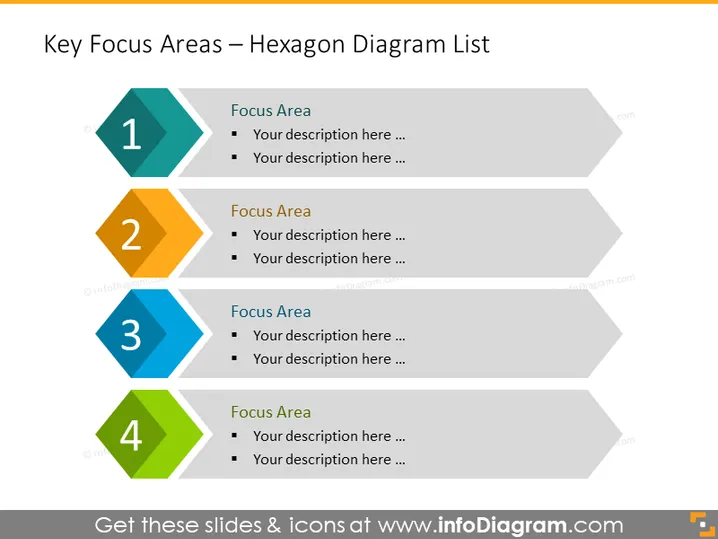
This PowerPoint slide displays a structured approach to outline "Key Focus Areas" using a hexagon diagram list. Each hexagon, numbered from 1 to 4, represents a unique focus area, where more specific details or descriptions can be added beneath each number. This format clearly structures information in an ordered sequence, suggesting a priority or step-by-step progression through the focus areas. Each hexagon is also accompanied by bullet points, indicating that further elaboration on each focal point is expected.
Graphical Look
- Four hexagons aligned diagonally from top left to bottom right, each with a unique color (teal, yellow-orange, blue, and green) and numbered from 1 to 4.
- Next to each hexagon is a rectangular text placeholder with a header labeled "Focus Area" and two bullet points stating "Your description here ...".
- The hexagons have a subtle 3D effect, and their colors are fill colors rather than solid, indicating a level of transparency.
- The text within the placeholders uses a sans-serif font, contributing to the slide's modern and clean aesthetic.
- The design is minimalistic, using geometric shapes and limited text to convey the message.
- Drop shadows add depth to the hexagons, enhancing the 3D effect.
The slide has a straightforward and professional design, using simple geometric shapes and limited text to keep the audience focused on the key points. The colored hexagons draw attention and help differentiate between focus areas.
Use Cases
- To present a strategic plan's main components, outlining what areas need attention or action.
- In project management overviews, highlighting phases, milestones, or key deliverables.
- For summarizing the primary goals or objectives in a business pitch to potential investors or partners.
- During internal meetings to communicate departmental priorities or operational focuses.
How to Edit
How to edit text & colors

How to expand / shorten diagram

How to Replace Icons in infoDiagram PPT


