
Reviews
Ihre Grafiken verleihen meinen Präsentationen eine nette Note, und ich habe sie kürzlich für eines meiner All-Hands-Meetings verwendet. Ihre Toolbox verleiht meinen Folien Professionalität, anstatt Standard-Clipart zu verwenden.
Ich brauchte einen neuen Blick auf einige meiner Folien. Ich habe versucht, einen Weg zu finden, einen Pinselschlag-Effekt zu erzielen, um zu unterstreichen, hervorzuheben, Farbe hinzuzufügen, und die handgeschriebenen Markierungen waren genau das Richtige. Sehr einfach zu bedienen, leicht in der Größe zu ändern, die Farbe zu ändern. Es war eine erschwingliche, perfekte Lösung und ich empfehle sie gerne weiter.
Die klare, saubere Optik der Grafiken und die Tatsache, dass ich die Farben leicht bearbeiten und an die Vorlage anpassen konnte, war mein Hauptgrund für den Kauf.
Description
Performance Indexes Comparison Gauges
Slide Content
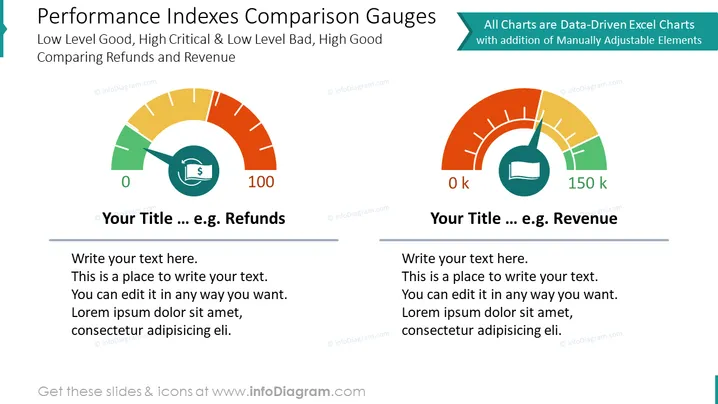
The slide illustrates two performance gauges that compare different metrics, indicating 'Refunds' and 'Revenue' as examples. The left gauge presents a green to red gradient suggesting that low levels are good and high levels are critical, which is typically applied to measures where a lower figure is preferred, like a refund or error rate. The right gauge inversely represents a metric where high figures are favorable, as it's color-coded green in the higher end, suitable for KPIs like revenue or sales volume. Placeholder text below each gauge suggests areas for customization.
Graphical Look
- Two semi-circle gauge charts dominate the slide, side by side, one on the left and one on the right.
- Each gauge has a colored gradient: the left one transitions from green to red and the right one from red to green.
- A needle on each gauge points towards a value, indicating a measurement.
- Placeholder texts "Your Title ... e.g., Refunds" and "Your Title ... e.g., Revenue" are present above each gauge.
- Below each gauge, there is a text box with placeholder lines for additional detail or description.
The slide features a bold, clean design with a good balance of graphics and text. The contrasting colors draw attention to the gauges, which are the focal point.
Use Cases
- Showcasing key performance indicators (KPIs) during business presentations.
- Visual comparison of targets versus actual results in team meetings or reports.
- Discussing efficiency and performance in sectors like customer service or sales in management reviews.
- Demonstrating financial metrics such as revenue growth or cost reduction strategies in company-wide assemblies.
How to Edit
How to edit text & colors

How to expand / shorten diagram

How to Replace Icons in infoDiagram PPT


