Reviews
Sus gráficos añaden un toque agradable a mis presentaciones y recientemente los usé para una de mis reuniones generales. Su conjunto de herramientas añade profesionalismo a mis diapositivas. En lugar de usar imágenes prediseñadas estándar.
Necesitaba un aspecto fresco para algunas de mis diapositivas. Había intentado encontrar una forma de crear un efecto de pincel, de subrayar, acentuar, añadir algo de color y los marcadores escritos a mano fueron justo lo que necesitaba. Muy fácil de usar, fácil de ajustar el tamaño, cambiar el color. Fue una solución asequible y perfecta, y estoy feliz de recomendarla.
El aspecto nítido y limpio de los gráficos, y el hecho de que me permitiera editar y cambiar fácilmente los colores para que coincidieran con la plantilla fue mi principal razón para comprarlos.
Description
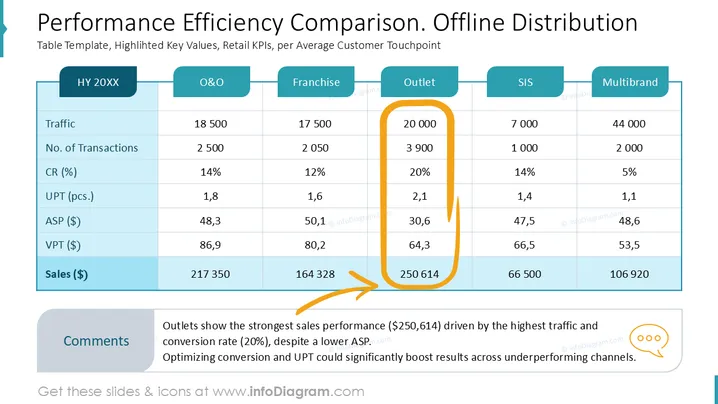
Performance Efficiency Comparison. Offline Distribution
Slide Content
The slide presents a comparison of performance efficiency across different distribution channels, focusing on several key performance indicators (KPIs). It showcases:
- Traffic: Measures the footfall or number of visitors; high traffic indicates greater customer interest.
- No. of Transactions: Counts customer purchases; more transactions reflect better sales volume.
- CR (%): Conversion Rate; the percentage of visitors who make a purchase.
- UPT (pcs.): Units Per Transaction; indicates the average number of items per purchase.
- ASP ($): Average Selling Price; the price per unit sold.
- VPT ($): Value Per Transaction; the total sales value from transactions.
- Sales ($): Overall sales performance, highlighting the financial outcome per channel.
Graphical Look
- The slide is structured with a neatly organized table, dividing information into different columns for each distribution channel.
- A prominent dark turquoise header runs atop each column to signify different channels such as O&O, Franchise, Outlet, SIS, and Multibrand.
- The numerical values are presented in clear rows for consistent comparison.
- An orange outline marks the "Outlet" column, emphasizing its significance as a key performer.
- Below the table is a comment box, with insights pointed out by a simple, orange arrow.
- Overall textual content is black and the highlighted total sales figures are on a light blue background for emphasis.
- The design is balanced, maintaining clarity and readability, while contrasting colors highlight specific data points.
Overall, the slide leverages color contrast and clear typography to facilitate data comparison. The emphasis on the Outlet channel highlights superior performance, making insights clear and focused.

Use Cases
- Retail Strategy Meetings: To analyze channel performance and strategize improvements.
- Sales Review Sessions: For discussing sales outcomes and efficiencies.
- Quarterly Business Reviews: To evaluate the impact of different distribution channels.
- Executive Present ations: To communicate performance metrics to stakeholders effectively.
How to Edit
How to edit text & colors

How to expand / shorten diagram

How to Replace Icons in infoDiagram PPT


