
Reviews
Ihre Grafiken verleihen meinen Präsentationen eine nette Note, und ich habe sie kürzlich für eines meiner All-Hands-Meetings verwendet. Ihre Toolbox verleiht meinen Folien Professionalität, anstatt Standard-Clipart zu verwenden.
Ich brauchte einen neuen Blick auf einige meiner Folien. Ich habe versucht, einen Weg zu finden, einen Pinselschlag-Effekt zu erzielen, um zu unterstreichen, hervorzuheben, Farbe hinzuzufügen, und die handgeschriebenen Markierungen waren genau das Richtige. Sehr einfach zu bedienen, leicht in der Größe zu ändern, die Farbe zu ändern. Es war eine erschwingliche, perfekte Lösung und ich empfehle sie gerne weiter.
Die klare, saubere Optik der Grafiken und die Tatsache, dass ich die Farben leicht bearbeiten und an die Vorlage anpassen konnte, war mein Hauptgrund für den Kauf.
Description
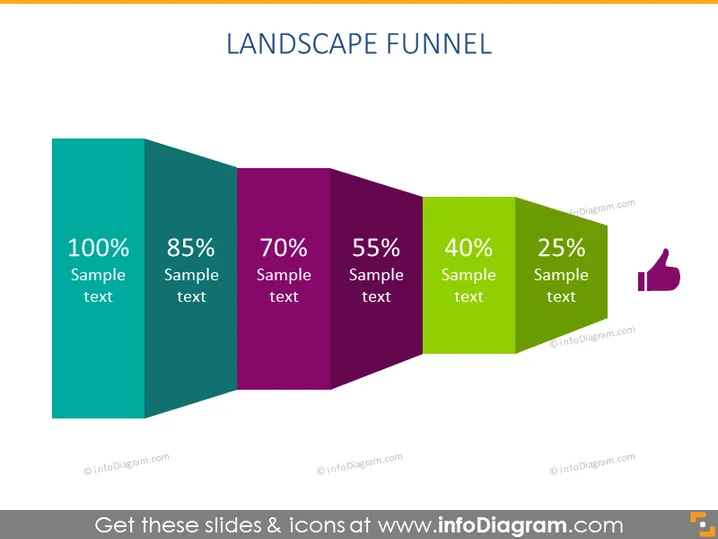
LANDSCAPE FUNNEL
Slide Content
The slide presents a "Landscape Funnel" using colored blocks representing different stages of a process or progression. Each block has a percentage value and some sample text, explaining the meaning of that particular stage. The blocks display a descending order of percentages: "100% Sample text", "85% Sample text", "70% Sample text", "55% Sample text", "40% Sample text", and "25% Sample text". This likely signifies a decrease in quantity or conversion through various phases, typically observed in sales or project management funnels, where the total number starts higher and gets refined down through each step.
Graphical Look
- The slide’s background is plain white.
- A 3D funnel graphic dominates the slide, composed of six blocks with diminishing widths.
- Each block, representing a stage of the funnel, has a different color: teal, dark teal, purple, dark purple, lime green, and dark lime green.
- The funnel stages are labeled with a percentage and accompanying "Sample text" in white font.
- A thumbs-up icon in a matching dark lime green shade is aligned with the final block of the funnel.
- A subtle shadow is cast beneath the funnel graphic, giving a sense of depth.
The overall look of the slide is clean and modern, with colorful blocks making the funnel visually engaging and easy to understand at a glance.
Use Cases
- To visualize the stages of a sales process, showcasing the decreasing number of prospects at each phase.
- To represent customer journey mapping, where each stage corresponds to a different phase of the customer experience.
- For displaying conversion rates in marketing campaigns, from initial contact through to purchase.
- In project management, to illustrate the filtering of ideas or tasks through a prioritizing process.
How to Edit
How to edit text & colors

How to expand / shorten diagram

How to Replace Icons in infoDiagram PPT


