

Your graphics add a nice touch to my presentations and I recently used them for one of my all-hands meetings. Your toolbox adds professionalism to my slides. Instead of using standard clipart.
Claude Jones, Director of Engineer, @Walmartlabs, USA

Your graphics add a nice touch to my presentations and I recently used them for one of my all-hands meetings. Your toolbox adds professionalism to my slides. Instead of using standard clipart.
Claude Jones, Director of Engineer, @Walmartlabs, USA
I needed a fresh look at some of my slides. I've tried to find a way to create a paintbrush effect, to underline, accentuate, add some color and the handwritten markers were just the things. Very easy to use, easy to size, change the color. It was an affordable, perfect solution and I'm happy to recommend it.
Anonymous, US
The crisp, clean look of the graphics, and the fact that it allowed me to easily edit and change the colors to match the template was my main reason for purchasing them.
Brandie Jenkins, E-learning Developer, USA
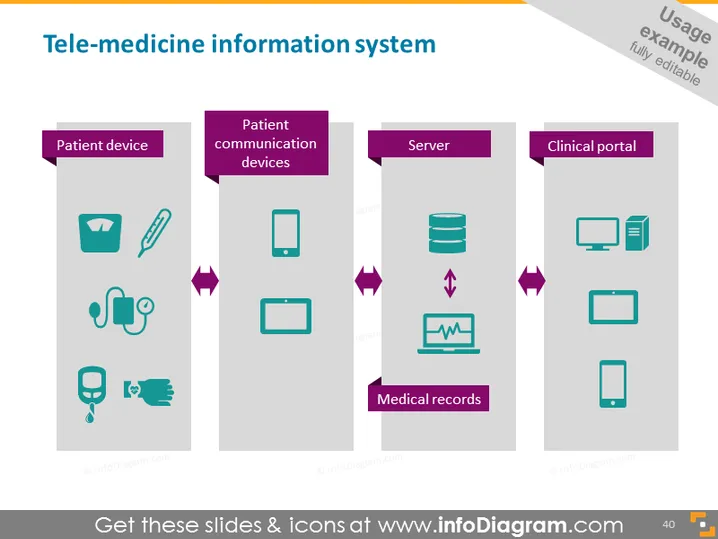
The slide outlines components of a tele-medicine information system, featuring four main categories: "Patient device," "Patient communication devices," "Server," and "Clinical portal." Each category is represented by relevant icons, expanding on the technology used within telehealth frameworks. "Patient device" includes medical and health monitoring tools, "Patient communication devices" refers to gadgets for patient-provider interaction, "Server" represents data storage and processing infrastructure, and "Clinical portal" encapsulates platforms for healthcare professional access.
The slide uses simple yet effective graphics to convey the structure of a tele-medicine information system, ensuring ease of understanding through visual aids. The color choices and icon styles contribute to a polished and modern presentation feel.



