

Your graphics add a nice touch to my presentations and I recently used them for one of my all-hands meetings. Your toolbox adds professionalism to my slides. Instead of using standard clipart.
Claude Jones, Director of Engineer, @Walmartlabs, USA

Your graphics add a nice touch to my presentations and I recently used them for one of my all-hands meetings. Your toolbox adds professionalism to my slides. Instead of using standard clipart.
Claude Jones, Director of Engineer, @Walmartlabs, USA
I needed a fresh look at some of my slides. I've tried to find a way to create a paintbrush effect, to underline, accentuate, add some color and the handwritten markers were just the things. Very easy to use, easy to size, change the color. It was an affordable, perfect solution and I'm happy to recommend it.
Anonymous, US
The crisp, clean look of the graphics, and the fact that it allowed me to easily edit and change the colors to match the template was my main reason for purchasing them.
Brandie Jenkins, E-learning Developer, USA
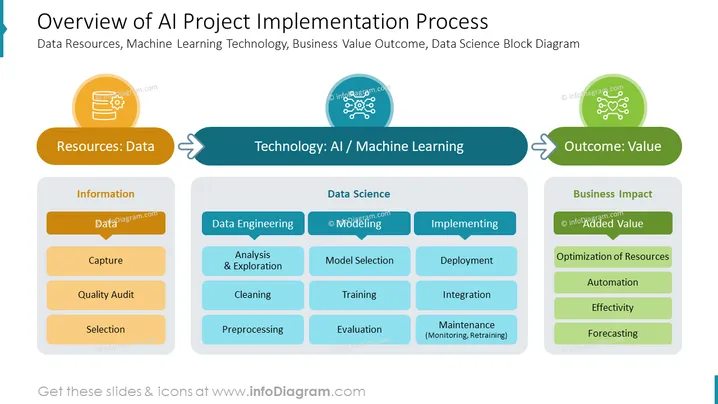
The slide details the phases of an AI project implementation process, outlining the steps from data resources to machine learning technology and the resultant business value. Under "Resources: Data," steps include Information, Capture, Quality Audit, and Selection, illustrating the process of gathering and preparing data. "Technology: AI / Machine Learning" covers Data Engineering, Modeling, and Implementing, which encompasses Analysis & Exploration, Cleaning, Preprocessing, Model Selection, Training, Evaluation, Deployment, Integration, and Maintenance. Finally, "Outcome: Value" lists the benefits, such as Added Value, Optimization of Resources, Automation, Effectivity, and Forecasting, showing the ultimate goals of applying AI.
The PowerPoint slide has a balanced and structured appearance, using color coding and icons to differentiate between the phases of the AI implementation process. The graphical elements are simple yet effective in conveying a process flow from raw data to value generation.



