
Reviews
Your graphics add a nice touch to my presentations and I recently used them for one of my all-hands meetings. Your toolbox adds professionalism to my slides. Instead of using standard clipart.
I needed a fresh look at some of my slides. I've tried to find a way to create a paintbrush effect, to underline, accentuate, add some color and the handwritten markers were just the things. Very easy to use, easy to size, change the color. It was an affordable, perfect solution and I'm happy to recommend it.
The crisp, clean look of the graphics, and the fact that it allowed me to easily edit and change the colors to match the template was my main reason for purchasing them.
Description
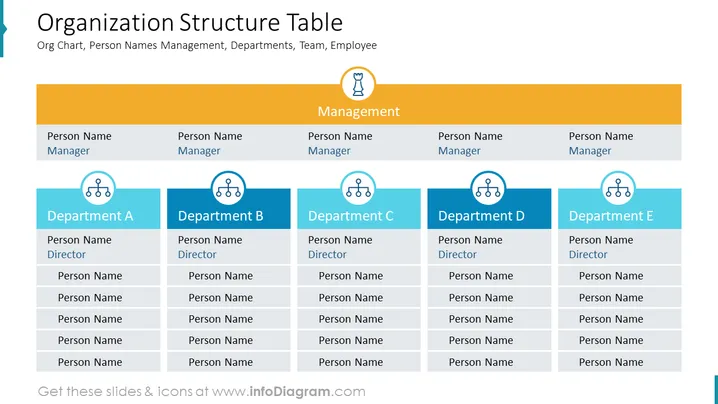
Organization Structure Table
Slide Content
The slide titled "Organization Structure Table" showcases a hierarchical representation of a company's management and departmental structure, including placeholders for the names of managers, directors, and employees in each department. There are five columns, each representing a department, under a unified management row that signifies the overarching leadership. Each department is labeled 'Department A' through 'E', with positions for a director and several team members, indicating a clear line of reporting and departmental organization within the business.
Graphical Look
- The slide background is white, creating a clean, professional look.
- A bold, blue-colored band on the left spans vertically, seemingly part of a continuing series or theme.
- There is a large, orange rectangular header spanning the top, with the slide title "Organization Structure Table" in white font, which provides a strong visual anchor.
- Below the header, a smaller mustard-colored bar spans the slide horizontally, labeled "Management" in white font, indicating a separate hierarchy level.
- There are five blue rectangular shapes aligned horizontally below the management bar, each representing different departments (labeled A to E).
- Each departmental rectangle contains six placeholders for names, the top one for a "Director" followed by five others implied for team members.
- There are icons of three linked circles on each department rectangle, symbolizing the interconnectivity within the department.
- Icons depicting a trophy and a light bulb are placed above the "Management" bar, signifying achievement and ideas/themes respectively.
The overall look of the slide is structured and symmetrical, with a clear color scheme that helps to differentiate between management and departmental levels. The icons and placeholders provide visual cues to aid in understanding the organizational hierarchy.
Use Cases
- To present the hierarchical structure of an organization during internal meetings or orientation sessions for new employees.
- For use in strategic planning sessions to discuss reorganization or departmental restructuring.
- As part of a business proposal or investor presentation to outline the company's leadership and team composition.
- During performance reviews or human resources briefings to visualize roles, responsibilities, and reporting relationships within the organization.
How to Edit
How to edit text & colors

How to expand / shorten diagram

How to Replace Icons in infoDiagram PPT


