
Reviews
Sus gráficos añaden un toque agradable a mis presentaciones y recientemente los usé para una de mis reuniones generales. Su conjunto de herramientas añade profesionalismo a mis diapositivas. En lugar de usar imágenes prediseñadas estándar.
Necesitaba un aspecto fresco para algunas de mis diapositivas. Había intentado encontrar una forma de crear un efecto de pincel, de subrayar, acentuar, añadir algo de color y los marcadores escritos a mano fueron justo lo que necesitaba. Muy fácil de usar, fácil de ajustar el tamaño, cambiar el color. Fue una solución asequible y perfecta, y estoy feliz de recomendarla.
El aspecto nítido y limpio de los gráficos, y el hecho de que me permitiera editar y cambiar fácilmente los colores para que coincidieran con la plantilla fue mi principal razón para comprarlos.
Description
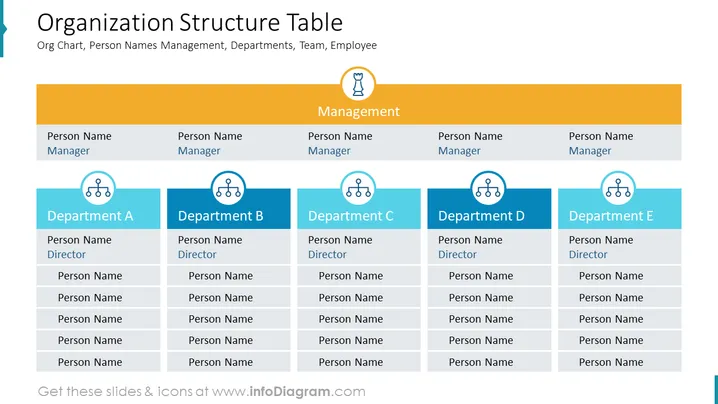
Organization Structure Table
Slide Content
The slide titled "Organization Structure Table" showcases a hierarchical representation of a company's management and departmental structure, including placeholders for the names of managers, directors, and employees in each department. There are five columns, each representing a department, under a unified management row that signifies the overarching leadership. Each department is labeled 'Department A' through 'E', with positions for a director and several team members, indicating a clear line of reporting and departmental organization within the business.
Graphical Look
- The slide background is white, creating a clean, professional look.
- A bold, blue-colored band on the left spans vertically, seemingly part of a continuing series or theme.
- There is a large, orange rectangular header spanning the top, with the slide title "Organization Structure Table" in white font, which provides a strong visual anchor.
- Below the header, a smaller mustard-colored bar spans the slide horizontally, labeled "Management" in white font, indicating a separate hierarchy level.
- There are five blue rectangular shapes aligned horizontally below the management bar, each representing different departments (labeled A to E).
- Each departmental rectangle contains six placeholders for names, the top one for a "Director" followed by five others implied for team members.
- There are icons of three linked circles on each department rectangle, symbolizing the interconnectivity within the department.
- Icons depicting a trophy and a light bulb are placed above the "Management" bar, signifying achievement and ideas/themes respectively.
The overall look of the slide is structured and symmetrical, with a clear color scheme that helps to differentiate between management and departmental levels. The icons and placeholders provide visual cues to aid in understanding the organizational hierarchy.
Use Cases
- To present the hierarchical structure of an organization during internal meetings or orientation sessions for new employees.
- For use in strategic planning sessions to discuss reorganization or departmental restructuring.
- As part of a business proposal or investor presentation to outline the company's leadership and team composition.
- During performance reviews or human resources briefings to visualize roles, responsibilities, and reporting relationships within the organization.
How to Edit
How to edit text & colors

How to expand / shorten diagram

How to Replace Icons in infoDiagram PPT


