

Your graphics add a nice touch to my presentations and I recently used them for one of my all-hands meetings. Your toolbox adds professionalism to my slides. Instead of using standard clipart.
Claude Jones, Director of Engineer, @Walmartlabs, USA

Your graphics add a nice touch to my presentations and I recently used them for one of my all-hands meetings. Your toolbox adds professionalism to my slides. Instead of using standard clipart.
Claude Jones, Director of Engineer, @Walmartlabs, USA
I needed a fresh look at some of my slides. I've tried to find a way to create a paintbrush effect, to underline, accentuate, add some color and the handwritten markers were just the things. Very easy to use, easy to size, change the color. It was an affordable, perfect solution and I'm happy to recommend it.
Anonymous, US
The crisp, clean look of the graphics, and the fact that it allowed me to easily edit and change the colors to match the template was my main reason for purchasing them.
Brandie Jenkins, E-learning Developer, USA
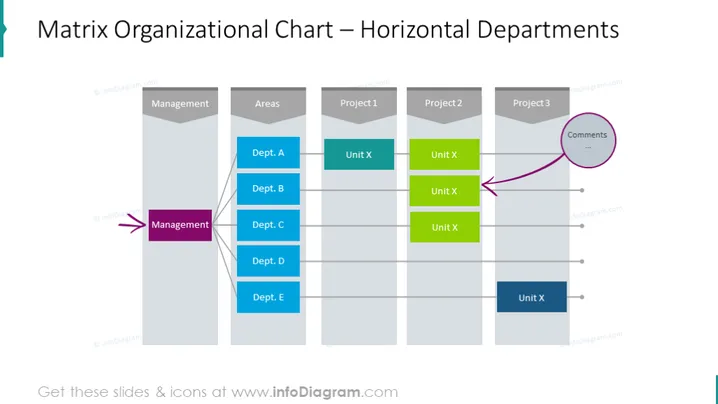
The slide presents a "Matrix Organizational Chart – Horizontal Departments," showing the structure of an organization where departments are arranged horizontally and intersect with various projects vertically. This matrix format represents the dual-reporting relationships in a typical matrix organization. Departments (A through E) are listed on the y-axis, and projects (1 through 3) are along the x-axis. Units tagged with "Unit X" are placed where departments contribute to the corresponding projects, illustrating multiple lines of authority and communication pathways. A comments section is indicated, suggesting a place for annotations or notes about specific project interactions.
The slide is visually organized with a clear matrix structure that employs color coding to distinguish different units. The simplicity of the design focuses the viewer's attention on the structural relationships between departments and projects.



