
Reviews
Sus gráficos añaden un toque agradable a mis presentaciones y recientemente los usé para una de mis reuniones generales. Su conjunto de herramientas añade profesionalismo a mis diapositivas. En lugar de usar imágenes prediseñadas estándar.
Necesitaba un aspecto fresco para algunas de mis diapositivas. Había intentado encontrar una forma de crear un efecto de pincel, de subrayar, acentuar, añadir algo de color y los marcadores escritos a mano fueron justo lo que necesitaba. Muy fácil de usar, fácil de ajustar el tamaño, cambiar el color. Fue una solución asequible y perfecta, y estoy feliz de recomendarla.
El aspecto nítido y limpio de los gráficos, y el hecho de que me permitiera editar y cambiar fácilmente los colores para que coincidieran con la plantilla fue mi principal razón para comprarlos.
Description
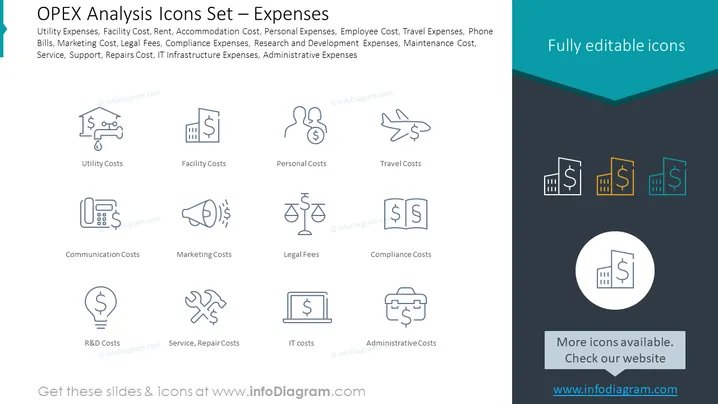
OPEX Analysis Icons Set – Expenses
Slide Content
The PowerPoint slide titled "OPEX Analysis Icons Set – Expenses" discusses various operational expenses that a company might incur. This includes Utility Expenses (like water and electricity bills), Facility Cost (building or property expenses), Rent, Accommodation Cost (expenses for lodging), Personal Expenses (individual staff costs), Employee Cost, Travel Expenses (costs associated with business trips), Phone Bills, Marketing Cost, Legal Fees, Compliance Expenses (costs to meet regulations), Research and Development Expenses, Maintenance Cost, Service and Support Costs, IT Infrastructure Expenses (expenses on technology resources), and Administrative Expenses (daily administrative operations).
Graphical Look
- The slide has a clean and modern design with a dark footer and a teal header.
- There are eight pairs of icons, each symbolizing a type of expense, placed in a 4x2 grid.
- Icons are line drawings in a light grey, with simple elements representing their respective costs.
- Below each icon, there's a label with the expense category written in dark text.
- The slide's upper right-hand corner features the text "Fully editable icons" in white against a teal backdrop.
- There's a circle in the bottom right with an icon of a building and currency, highlighting more icon availability.
The overall look of the slide is professional and minimalist, with a focus on icons representing different types of operational expenses. The icons and text are well-organized, rendering the slide easy to navigate and understand.
Use Cases
- Presenting a company's operational costs breakdown during financial meetings.
- Illustrating various expense categories in a budget proposal.
- Training new finance department employees on expense categorization.
- Enhancing financial report presentations with visual icons for each expense category.
How to Edit
How to edit text & colors

How to expand / shorten diagram

How to Replace Icons in infoDiagram PPT


