
Reviews
Sus gráficos añaden un toque agradable a mis presentaciones y recientemente los usé para una de mis reuniones generales. Su conjunto de herramientas añade profesionalismo a mis diapositivas. En lugar de usar imágenes prediseñadas estándar.
Necesitaba un aspecto fresco para algunas de mis diapositivas. Había intentado encontrar una forma de crear un efecto de pincel, de subrayar, acentuar, añadir algo de color y los marcadores escritos a mano fueron justo lo que necesitaba. Muy fácil de usar, fácil de ajustar el tamaño, cambiar el color. Fue una solución asequible y perfecta, y estoy feliz de recomendarla.
El aspecto nítido y limpio de los gráficos, y el hecho de que me permitiera editar y cambiar fácilmente los colores para que coincidieran con la plantilla fue mi principal razón para comprarlos.
Description
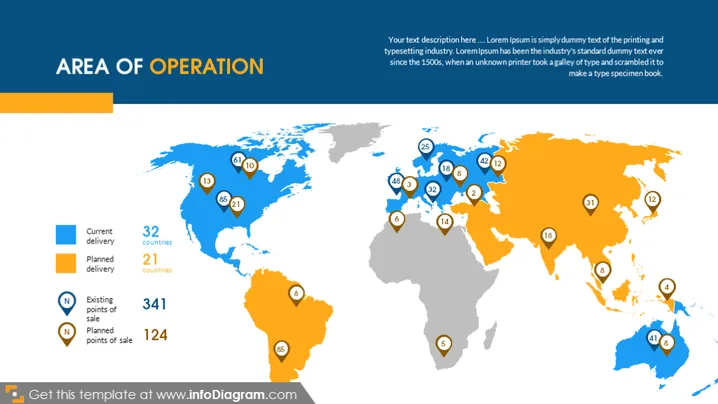
AREA OF OPERATION
Slide Content
The slide is titled 'AREA OF OPERATION', suggesting an overview of a company's global reach. It categorizes the presence into 'Current delivery' (32 countries), 'Planned delivery' (21 countries), 'Existing points of sale' (341), and 'Planned points of sale' (124), indicating both a current and future strategic footprint.
Graphical Look
- A world map serves as the slide's primary graphic.
- Countries are colored in two shades: light blue for current operations and orange for planned operations.
- Small white circles with numbers represent points of sale, with blue circles for existing and orange for future points.
- The legend on the left matches the map's color scheme and has corresponding explanatory icons and text.
- Icons include a shipping box (current delivery), a calendar page (planned delivery), a store (existing points of sale), and a pin with a plus sign (planned points of sale).
- A horizontal orange banner accents the top of the slide, matching the planned operations color and contains the title text.
The slide is clean and professional, using a color-coding system to differentiate between current and future business operations. The visual elements are simple yet effective in conveying the intended information.
Use Cases
- To present the company's global footprint in a business strategy or investor presentation.
- For internal briefings to provide employees with an understanding of the company's market coverage.
- To visually represent expansion plans to potential partners or stakeholders.
- In marketing materials to showcase the widespread presence and future growth areas to customers.
How to Edit
How to edit text & colors

How to expand / shorten diagram

How to Replace Icons in infoDiagram PPT


