
Reviews
Sus gráficos añaden un toque agradable a mis presentaciones y recientemente los usé para una de mis reuniones generales. Su conjunto de herramientas añade profesionalismo a mis diapositivas. En lugar de usar imágenes prediseñadas estándar.
Necesitaba un aspecto fresco para algunas de mis diapositivas. Había intentado encontrar una forma de crear un efecto de pincel, de subrayar, acentuar, añadir algo de color y los marcadores escritos a mano fueron justo lo que necesitaba. Muy fácil de usar, fácil de ajustar el tamaño, cambiar el color. Fue una solución asequible y perfecta, y estoy feliz de recomendarla.
El aspecto nítido y limpio de los gráficos, y el hecho de que me permitiera editar y cambiar fácilmente los colores para que coincidieran con la plantilla fue mi principal razón para comprarlos.
Description
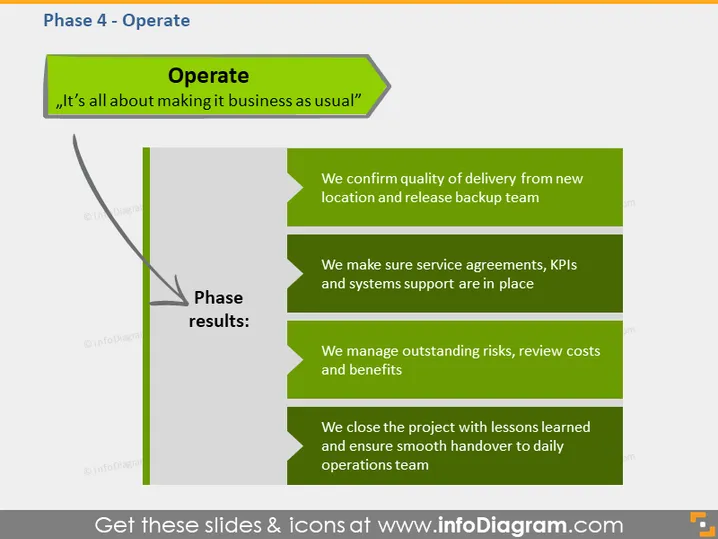
Phase 4 - Operate
Slide Content
The slide is titled "Operate" and emphasizes that this phase is "all about making it business as usual." The content outlines the results expected during this phase: confirming the quality of delivery and releasing the backup team, ensuring service agreements and support systems are in place, managing risks while reviewing costs and benefits, and closing the project with lessons learned for a smooth handover to the daily operations team. Each bullet point represents a critical aspect of transitioning into standard operations.
Graphical Look
- The slide background is solid gray.
- A large green arrow-shaped banner at the top contains the word "Operate."
- A quote in white italics on the green background states, "It’s all about making it business as usual."
- A vertical gray line divides the slide into two sections.
- To the left of the divider, a semi-transparent graphic of a curved arrow pointing downwards, labeled "Phase results:".
- Four green rectangular shapes to the right of the divider, each with white text outlining the phase results.
The slide’s overall design is modern and business-oriented, with a clean and organized layout. The use of green emphasizes important aspects and results, while the curved arrow guides the viewer through the content in a logical progression.
Use Cases
- Presenting the operation phase in a project management plan to outline the steps for maintaining regular business functions.
- In a briefing to project stakeholders, to emphasize the transition processes required to establish everyday business activities post-implementation.
- As part of a training session for project managers, to illustrate best practices for the operational phase of project life cycles.
- During a review meeting, to evaluate the success of the operational transition and ensure all necessary measures are in place for continuous service delivery.
How to Edit
How to edit text & colors

How to expand / shorten diagram

How to Replace Icons in infoDiagram PPT


