

Your graphics add a nice touch to my presentations and I recently used them for one of my all-hands meetings. Your toolbox adds professionalism to my slides. Instead of using standard clipart.
Claude Jones, Director of Engineer, @Walmartlabs, USA

Your graphics add a nice touch to my presentations and I recently used them for one of my all-hands meetings. Your toolbox adds professionalism to my slides. Instead of using standard clipart.
Claude Jones, Director of Engineer, @Walmartlabs, USA
I needed a fresh look at some of my slides. I've tried to find a way to create a paintbrush effect, to underline, accentuate, add some color and the handwritten markers were just the things. Very easy to use, easy to size, change the color. It was an affordable, perfect solution and I'm happy to recommend it.
Anonymous, US
The crisp, clean look of the graphics, and the fact that it allowed me to easily edit and change the colors to match the template was my main reason for purchasing them.
Brandie Jenkins, E-learning Developer, USA
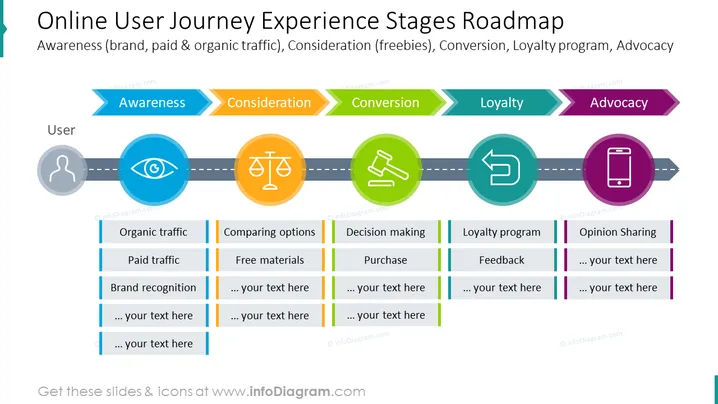
The slide maps out the stages of an online user's journey with a brand, from initial Awareness (including brand, paid, and organic traffic), through Consideration (engaging with freebies), to Conversion (making a purchase), followed by Loyalty (participation in loyalty programs), and culminating in Advocacy (sharing opinions). Each stage has associated actions such as organic and paid traffic generation, option comparison, decision-making, feedback, and opinion sharing that are pivotal in guiding a user through the customer lifecycle.
The visual design of the slide is organized and colorful, with distinctive icons and color coding for each stage of the user journey, making it an effective tool for presenting a complex process in an easily digestible format.
This slide could be used in business presentations for educating marketing teams about customer experience strategies, for briefing product development teams on user experience considerations, in sales meetings to discuss customer lifecycle management, or in workshops aimed at improving customer engagement and retention.



