
Reviews
Ihre Grafiken verleihen meinen Präsentationen eine nette Note, und ich habe sie kürzlich für eines meiner All-Hands-Meetings verwendet. Ihre Toolbox verleiht meinen Folien Professionalität, anstatt Standard-Clipart zu verwenden.
Ich brauchte einen neuen Blick auf einige meiner Folien. Ich habe versucht, einen Weg zu finden, einen Pinselschlag-Effekt zu erzielen, um zu unterstreichen, hervorzuheben, Farbe hinzuzufügen, und die handgeschriebenen Markierungen waren genau das Richtige. Sehr einfach zu bedienen, leicht in der Größe zu ändern, die Farbe zu ändern. Es war eine erschwingliche, perfekte Lösung und ich empfehle sie gerne weiter.
Die klare, saubere Optik der Grafiken und die Tatsache, dass ich die Farben leicht bearbeiten und an die Vorlage anpassen konnte, war mein Hauptgrund für den Kauf.
Description
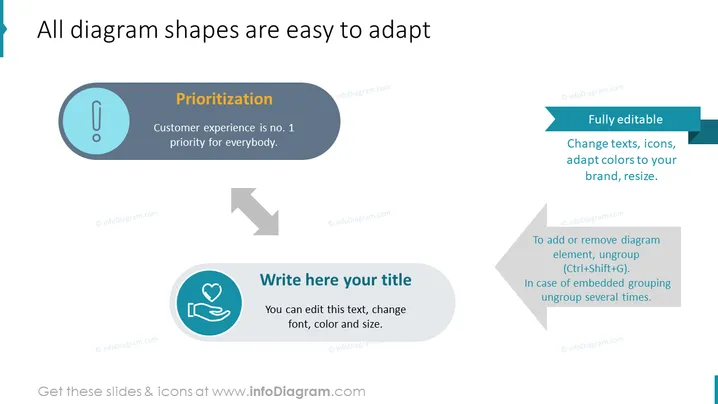
All diagram shapes are easy to adapt
Slide Content
The PowerPoint slide focuses on the adaptability of diagram shapes for presentation purposes. "Prioritization" is highlighted as being key, with customer experience noted as the foremost priority. The slide emphasizes full editability, which allows users to change texts, icons, adapt colors to brand specifics, and resize elements as needed. Additionally, it provides guidance on adding or removing diagram elements through the ungrouping feature, requiring specific keyboard shortcuts or multiple ungroup actions depending on grouping.
Graphical Look
- A large title "All diagram shapes are easy to adapt" is positioned at the top of the slide.
- Two circular icons with different symbols inside - an exclamation mark and a heart within hands - are aligned horizontally.
- Each circular icon is accompanied by a colored text box that provides instructions or context for the imagery.
- Arrows direct the viewer's attention from one circular icon to the text box explaining the concept of adaptability.
- Text within the colored boxes uses a contrasting font color for readability.
- The background is white, making the colorful elements stand out.
The slide has a clean and modern design, with a simple color palette that directs focus to the content. The use of circular icons with corresponding text boxes helps to create an easy-to-follow visual flow.
Use Cases
- To demonstrate the customization features of a service or product during a sales presentation.
- In a training session, to teach users how to modify templates or visual elements within software.
- During a marketing meeting, to illustrate the adaptability of a campaign's visual assets.
- To guide team members in a project update meeting on how to align their presentation materials with the brand's visual identity.
How to Edit
How to edit text & colors

How to expand / shorten diagram

How to Replace Icons in infoDiagram PPT


