
Reviews
Sus gráficos añaden un toque agradable a mis presentaciones y recientemente los usé para una de mis reuniones generales. Su conjunto de herramientas añade profesionalismo a mis diapositivas. En lugar de usar imágenes prediseñadas estándar.
Necesitaba un aspecto fresco para algunas de mis diapositivas. Había intentado encontrar una forma de crear un efecto de pincel, de subrayar, acentuar, añadir algo de color y los marcadores escritos a mano fueron justo lo que necesitaba. Muy fácil de usar, fácil de ajustar el tamaño, cambiar el color. Fue una solución asequible y perfecta, y estoy feliz de recomendarla.
El aspecto nítido y limpio de los gráficos, y el hecho de que me permitiera editar y cambiar fácilmente los colores para que coincidieran con la plantilla fue mi principal razón para comprarlos.
Description
Omni-Customer Promise
Slide Content
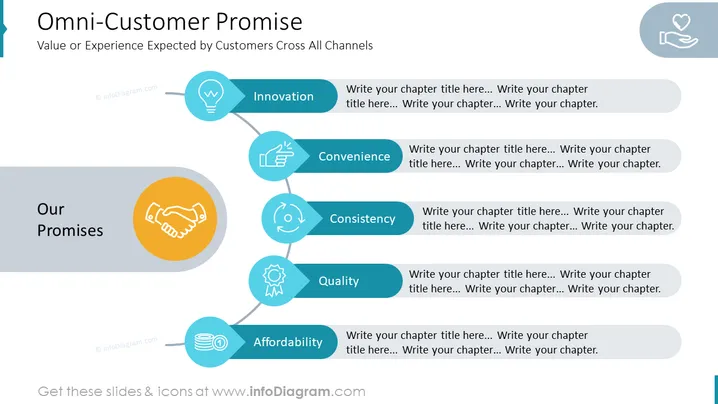
- Value or Experience Expected by Customers Cross All Channels: Customers expect to have a consistent and valuable experience across all channels, whether they're shopping online, in-store, or over the phone.
- Innovation: Customers expect companies to be innovative and offer new products and services that meet their changing needs.
- Convenience: Customers want to be able to do business with companies in a way that is convenient for them. This means having multiple ways to contact customer service, flexible shipping and return options, and easy-to-use websites and mobile apps.
- Affordability: Customers want to get the best possible value for their money. This means being transparent about pricing and offering discounts and promotions.
- Consistency: Customers expect to have the same experience regardless of how they interact with a company. This means having consistent branding, messaging, and policies across all channels.
- Quality: Customers expect high-quality products and services. This means using high-quality materials, providing excellent customer service, and standing behind your products and services.
Graphical Look
- Simple design with white background.
- Clear and easy-to-read text with large font size.
- Icons to represent each promise, reinforcing key messages.
- Clean, professional, and visually appealing overall design.
Analysis of Graphical Look
The PowerPoint slide uses a variety of graphical elements to create a visually appealing and informative presentation. The use of color and icons is particularly effective in helping to communicate the key messages of the slide. The overall design of the slide is clean and professional, and it is likely to be effective in engaging the audience.
How to Edit
How to edit text & colors

How to expand / shorten diagram

How to Replace Icons in infoDiagram PPT


