

Your graphics add a nice touch to my presentations and I recently used them for one of my all-hands meetings. Your toolbox adds professionalism to my slides. Instead of using standard clipart.
Claude Jones, Director of Engineer, @Walmartlabs, USA

Your graphics add a nice touch to my presentations and I recently used them for one of my all-hands meetings. Your toolbox adds professionalism to my slides. Instead of using standard clipart.
Claude Jones, Director of Engineer, @Walmartlabs, USA
I needed a fresh look at some of my slides. I've tried to find a way to create a paintbrush effect, to underline, accentuate, add some color and the handwritten markers were just the things. Very easy to use, easy to size, change the color. It was an affordable, perfect solution and I'm happy to recommend it.
Anonymous, US
The crisp, clean look of the graphics, and the fact that it allowed me to easily edit and change the colors to match the template was my main reason for purchasing them.
Brandie Jenkins, E-learning Developer, USA
##Slide content:
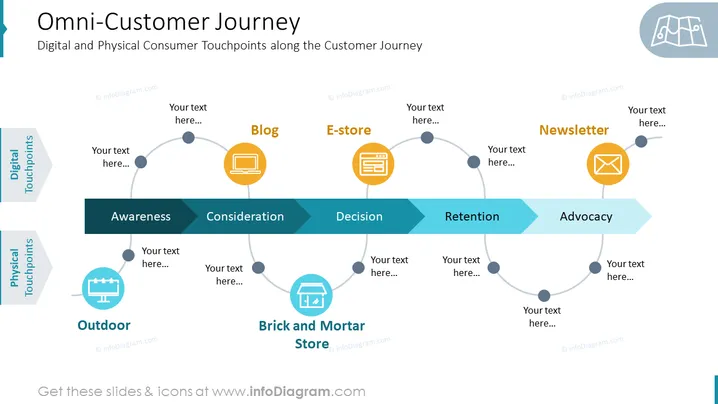
This slide presents the omnichannel customer journey through the main stages like awareness, consideration, decision, retention, and advocacy. We split the journey through both physical and digital touchpoints with a connecting line, so you can present this type of extensive information more simply and cleanly. In our example, we have put outdoor advertising as a physical touchpoint for awareness, blogs in consideration in the digital touchpoints, brick-and-mortar stores for both consideration and decision as a physical touchpoint, e-store as a deciding factor, and newsletter for advocacy in the digital touchpoints. Adding representative icons can help your audience understand everything in a faster way. We have added also enough space above every point so you can add a short description. This PowerPoint template is part of the Omnichannel Retailing Strategy presentation. Click on the slide to see the whole deck.
##Slide infographic description:
Touchpoints Diagram, Gradient Color Arrow-Shaped Vector Banner, Billboard Icon, PC Icon, Store Icon, E-Shop Icon, Letter Icon



