

Your graphics add a nice touch to my presentations and I recently used them for one of my all-hands meetings. Your toolbox adds professionalism to my slides. Instead of using standard clipart.
Claude Jones, Director of Engineer, @Walmartlabs, USA

Your graphics add a nice touch to my presentations and I recently used them for one of my all-hands meetings. Your toolbox adds professionalism to my slides. Instead of using standard clipart.
Claude Jones, Director of Engineer, @Walmartlabs, USA
I needed a fresh look at some of my slides. I've tried to find a way to create a paintbrush effect, to underline, accentuate, add some color and the handwritten markers were just the things. Very easy to use, easy to size, change the color. It was an affordable, perfect solution and I'm happy to recommend it.
Anonymous, US
The crisp, clean look of the graphics, and the fact that it allowed me to easily edit and change the colors to match the template was my main reason for purchasing them.
Brandie Jenkins, E-learning Developer, USA
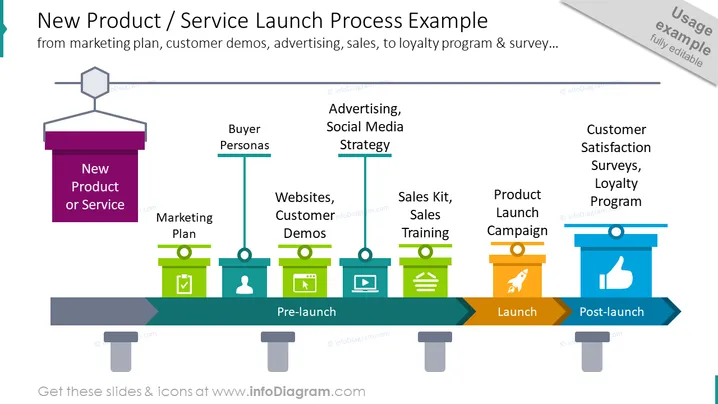
The slide illustrates the various stages of a new product or service launch process. It highlights key elements such as Marketing Plan, Buyer Personas, Advertising, Social Media Strategy, Websites, Customer Demos, Sales Kit, Sales Training, Product Launch Campaign, and Customer Satisfaction Surveys, Loyalty Program. These elements are organized chronologically into pre-launch, launch, and post-launch phases to portray a comprehensive overview of the launch process from initial planning to post-launch activities that aim to maintain customer engagement and loyalty.
The slide has a modern and professional appearance, using a coherent color scheme and simple graphics to effectively communicate the stages of a product or service launch. The visual flow is intuitive, guiding the viewer through each phase in a linear manner.



