
Reviews
Sus gráficos añaden un toque agradable a mis presentaciones y recientemente los usé para una de mis reuniones generales. Su conjunto de herramientas añade profesionalismo a mis diapositivas. En lugar de usar imágenes prediseñadas estándar.
Necesitaba un aspecto fresco para algunas de mis diapositivas. Había intentado encontrar una forma de crear un efecto de pincel, de subrayar, acentuar, añadir algo de color y los marcadores escritos a mano fueron justo lo que necesitaba. Muy fácil de usar, fácil de ajustar el tamaño, cambiar el color. Fue una solución asequible y perfecta, y estoy feliz de recomendarla.
El aspecto nítido y limpio de los gráficos, y el hecho de que me permitiera editar y cambiar fácilmente los colores para que coincidieran con la plantilla fue mi principal razón para comprarlos.
Description
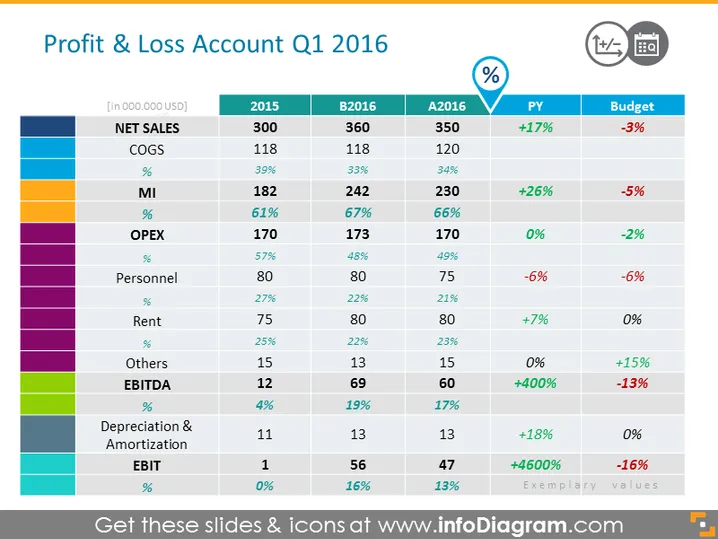
Retail Profit and Loss Statement Slide Content
Present your retail profit and loss statement with clear data and visualizations to make it look less overwhelming. We have added red color for losses/reductions, and green for increments. The table contains several important metrics such as:
- Net sales
- COGS (Cost Of Goods Sold)
- MI (Margin Income)
- OPEX (Operating Expenses)
- Personnel
- Rent
- Additional costs
- EBITDA (Earnings Before Interest, Taxes, Depreciation, and Amortization)
- Depreciation & Amortization
- EBIT All the types of costs are marked with a single color, so you can add also a legend for each group’s costs to make it even clearer. You can simply update the figures with factual ones, and your presentation will be ready. All shapes are vectors, so you can still make changes while keeping the quality of the presentation intact. This slide is part of the Retail Business Update Presentation Review Template. Click on the picture to see more slide presentation ideas.
Retail Profit and Loss Statement Slide Infographics
Financial Data Table, Colorful Headers, Color Coding, Teardrop Percentage Icon, Progressive Chart, Calendar Icon
How to Edit
How to edit text & colors

How to expand / shorten diagram

How to Replace Icons in infoDiagram PPT


