
Reviews
Your slides are my "secret sauce" when it comes to presenting my ideas to clients. I save a lot of time.
J'avais un délai de livraison à respecter et je n'avais pas le temps de créer une variété de modèles de diapositives. Infodiagram m'a proposé des options faciles à télécharger et à personnaliser en fonction de mes besoins !
Vos diapositives suscitent souvent de précieux commentaires et idées de la part de mon équipe, ce qui améliore les diapositives finales.
Description
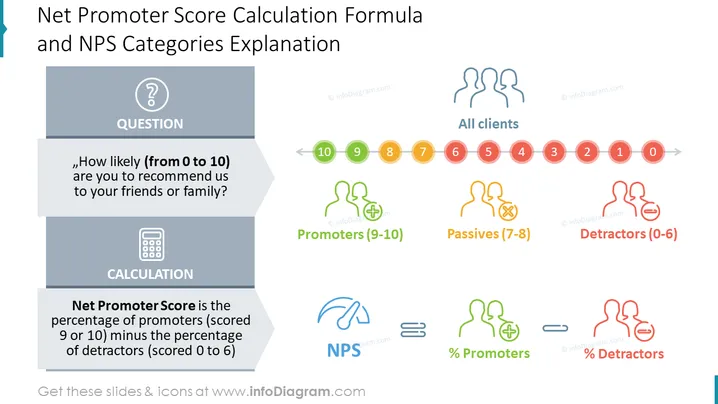
Net Promoter Score Calculation Formula and NPS Categories Explanation
This PowerPoint slide provides a comprehensive overview of the Net Promoter Score (NPS) metric, including its calculation formula and the categorization of customer responses. It is an ideal visual aid for presentations focused on customer loyalty, satisfaction, and feedback analysis. The clear and concise infographic design effectively conveys the key concepts of NPS, making it a valuable tool for business presentations related to customer experience management.
What Does This Net Promoter Score Calculation Formula and NPS Categories Explanation Slide Include?
- A central question highlighted in bold: "How likely (from 0 to 10) are you to recommend us to your friends or family?"
- A visual representation of the NPS scale, ranging from 0 to 10, with color-coded segments for Detractors (0-6), Passives (7-8), and Promoters (9-10)
- A clear explanation of the NPS calculation: NPS = % Promoters - % Detractors
- A concise definition of each customer category: Detractors are unlikely to recommend the company, Passives are neutral, and Promoters are highly likely to recommend the company
- Outline icons of people, rating, promoters, passives, detractors
This Net Promoter Score Calculation Formula and NPS Categories Explanation Slide is a part of our NPS Analysis Dashboards for Customer Loyalty Metrics PPT Template.
How to Edit
How to edit text & colors

How to expand / shorten diagram

How to Replace Icons in infoDiagram PPT


