
Reviews
Ihre Grafiken verleihen meinen Präsentationen eine nette Note, und ich habe sie kürzlich für eines meiner All-Hands-Meetings verwendet. Ihre Toolbox verleiht meinen Folien Professionalität, anstatt Standard-Clipart zu verwenden.
Ich brauchte einen neuen Blick auf einige meiner Folien. Ich habe versucht, einen Weg zu finden, einen Pinselschlag-Effekt zu erzielen, um zu unterstreichen, hervorzuheben, Farbe hinzuzufügen, und die handgeschriebenen Markierungen waren genau das Richtige. Sehr einfach zu bedienen, leicht in der Größe zu ändern, die Farbe zu ändern. Es war eine erschwingliche, perfekte Lösung und ich empfehle sie gerne weiter.
Die klare, saubere Optik der Grafiken und die Tatsache, dass ich die Farben leicht bearbeiten und an die Vorlage anpassen konnte, war mein Hauptgrund für den Kauf.
Description
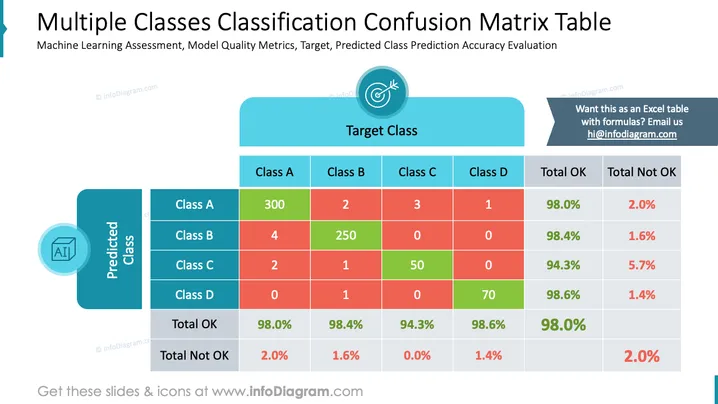
Multiple Classes Classification Confusion Matrix Table
Slide Content
This PowerPoint slide presents a confusion matrix for evaluating the performance of a machine learning classification model across multiple classes (A, B, C, D). It includes predictions vs. expected target class results, with correct predictions highlighted in green and incorrect ones in red. Percentages of correct (Total OK) and incorrect (Total Not OK) predictions are shown for each class. The confusion matrix is structured to indicate how often the model correctly or incorrectly predicts a class, which is key for understanding its accuracy.
Graphical Look
- The title is in a large, bold font at the top of the slide.
- A subtitle is positioned below the title in a smaller font.
- A matrix table is centered on the slide, with rows labeled "Predicted Class" and columns labeled "Target Class."
- The matrix uses a color code: green for correct predictions and red for incorrect ones.
- Each cell within the matrix contains a number or a percentage.
- To the left of the matrix, there is a vertical list of predicted classes, with an icon representing AI at the top.
- Above the matrix, there is a horizontal list of target classes, with a circular target icon.
The slide combines a mix of text, colors, and graphical elements to present data in a clear and visually distinguishable manner. The contrast between green and red instantly communicates correct and incorrect predictions, which helps quickly assess the model's performance.
Use Cases
- To present the accuracy of a machine learning model in a business meeting.
- To analyze the performance of classification algorithms in an educational setting.
- For data scientists to review and discuss model improvements with their team.
- To include in reports or presentations to stakeholders interested in the effectiveness of predictive analytics.
How to Edit
How to edit text & colors

How to expand / shorten diagram

How to Replace Icons in infoDiagram PPT


