
Reviews
Your slides are my 'secret sauce' when it comes to visualising my ideas to clients. I'm saving so much time.
InfoDiagram has been a wonderful resource since I found the product site a few years ago.
Your slides often generate good comments and ideas from my team that improve the final slides.
Description
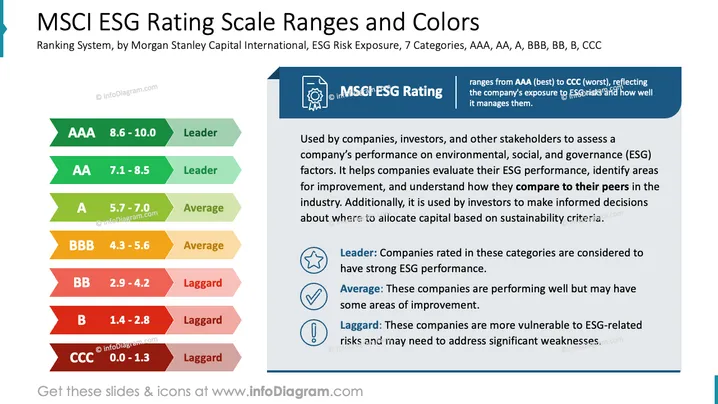
MSCI ESG Rating Scale Ranges and Colors
Slide Content
The slide explains the MSCI ESG Rating Scale. It features a ranking system with seven categories: AAA, AA, A, BBB, BB, B, CCC. These categories assess a company’s ESG performance:
- Leader (AAA, AA): Companies with strong ESG performance.
- Average (A, BBB): Companies performing well but with improvement areas.
- Laggard (BB, B, CCC): Companies vulnerable to ESG risks needing significant improvement.
The ratings help stakeholders evaluate environmental, social, and governance factors.
Graphical Look
- The slide has a clean, professional layout.
- A vertical column on the left displays colored bars representing each rating category; green for leaders, yellow-beige for average, and red for laggards.
- Each bar contains the rating letter, score range, and category.
- A blue rectangular banner at the top right with an icon outlines the rating system introduction.
- Three circular icons on the lower right accompany explanations for leader, average, and laggard categories.
The slide captures attention with its clear division of information through color coding and structured layout, enhancing comprehension and visual appeal.
Use Cases
- Corporate Sustainability Reports: To communicate ESG performance to stakeholders.
- Investor Presentations: Guide investment decisions by rating company sustainability.
- Board Meetings: For strategic planning and sustainability goal settings.
- Educational Seminars: Explain ESG ratings and their implications.
How to Edit
How to edit text & colors

How to expand / shorten diagram

How to Replace Icons in infoDiagram PPT


