

Your graphics add a nice touch to my presentations and I recently used them for one of my all-hands meetings. Your toolbox adds professionalism to my slides. Instead of using standard clipart.
Claude Jones, Director of Engineer, @Walmartlabs, USA

Your graphics add a nice touch to my presentations and I recently used them for one of my all-hands meetings. Your toolbox adds professionalism to my slides. Instead of using standard clipart.
Claude Jones, Director of Engineer, @Walmartlabs, USA
I needed a fresh look at some of my slides. I've tried to find a way to create a paintbrush effect, to underline, accentuate, add some color and the handwritten markers were just the things. Very easy to use, easy to size, change the color. It was an affordable, perfect solution and I'm happy to recommend it.
Anonymous, US
The crisp, clean look of the graphics, and the fact that it allowed me to easily edit and change the colors to match the template was my main reason for purchasing them.
Brandie Jenkins, E-learning Developer, USA
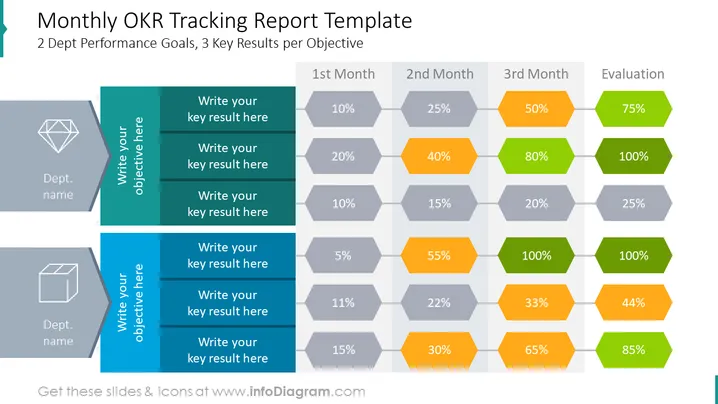
The slide is designed as a monthly OKR tracking report template, accommodating 2 departmental performance goals and up to 3 key results per objective. The template features a column for each month over a quarter, with percentage placeholders to indicate progress. At the end, there is an "Evaluation" column for the final assessment. This layout assists in visualizing progress over time and determining the effectiveness of actions taken toward achieving departmental objectives.
The slide is visually engaging with its use of geometric shapes and a gradient color scheme to distinguish between stages of completion, creating a clear visual hierarchy of information.
This slide is appropriate for use in monthly business review meetings, quarterly departmental reviews, or any situation where tracking the progress of specific objectives and key results is necessary. It facilitates a clear display of progress and final evaluations, making it a practical tool for performance management discussions.



