
Reviews
Sus gráficos añaden un toque agradable a mis presentaciones y recientemente los usé para una de mis reuniones generales. Su conjunto de herramientas añade profesionalismo a mis diapositivas. En lugar de usar imágenes prediseñadas estándar.
Necesitaba un aspecto fresco para algunas de mis diapositivas. Había intentado encontrar una forma de crear un efecto de pincel, de subrayar, acentuar, añadir algo de color y los marcadores escritos a mano fueron justo lo que necesitaba. Muy fácil de usar, fácil de ajustar el tamaño, cambiar el color. Fue una solución asequible y perfecta, y estoy feliz de recomendarla.
El aspecto nítido y limpio de los gráficos, y el hecho de que me permitiera editar y cambiar fácilmente los colores para que coincidieran con la plantilla fue mi principal razón para comprarlos.
Description
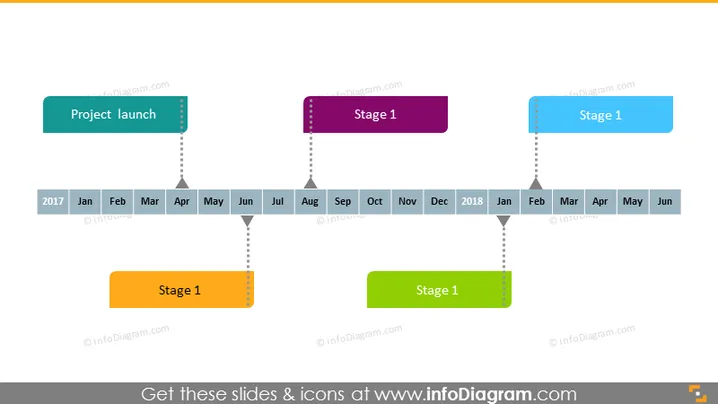
Monthly Project Plan Roadmap Timeline
Slide Content:
The PowerPoint slide is designed as a visual timeline depicting key stages of a project over a year and a half, from January 2017 to June 2018. Each stage is labeled as "Stage 1" or "Project launch," associated with different months, illustrated by colored rectangular labels. This layout is meant to provide an overview of the project's major milestones or phases and their expected timeframes, serving as a high-level project calendar.
Graphical Look:
- A horizontal timeline across the bottom, with the year 2017 on the left and 2018 on the right, and months labeled in black text.
- Colored rectangular shapes (teal, purple, orange, and green) floating above the timeline, each connected to a specific month by a dotted line.
- The overall color palette is soft and professional.
The slide's graphical elements are arranged neatly to provide a clear sequence of events in a project timeline, using colors to differentiate between the various stages.
Use Cases:
- To communicate project timelines during a project planning meeting.
- As a visual aid in quarterly business reviews to report on past and upcoming project milestones.
- In strategic planning sessions to align team members on key project deliverables and deadlines.
- During presentations to stakeholders to illustrate the progression and planning of business initiatives.
How to Edit
How to edit text & colors

How to expand / shorten diagram

How to Replace Icons in infoDiagram PPT


