Reviews
Sus gráficos añaden un toque agradable a mis presentaciones y recientemente los usé para una de mis reuniones generales. Su conjunto de herramientas añade profesionalismo a mis diapositivas. En lugar de usar imágenes prediseñadas estándar.
Necesitaba un aspecto fresco para algunas de mis diapositivas. Había intentado encontrar una forma de crear un efecto de pincel, de subrayar, acentuar, añadir algo de color y los marcadores escritos a mano fueron justo lo que necesitaba. Muy fácil de usar, fácil de ajustar el tamaño, cambiar el color. Fue una solución asequible y perfecta, y estoy feliz de recomendarla.
El aspecto nítido y limpio de los gráficos, y el hecho de que me permitiera editar y cambiar fácilmente los colores para que coincidieran con la plantilla fue mi principal razón para comprarlos.
Description
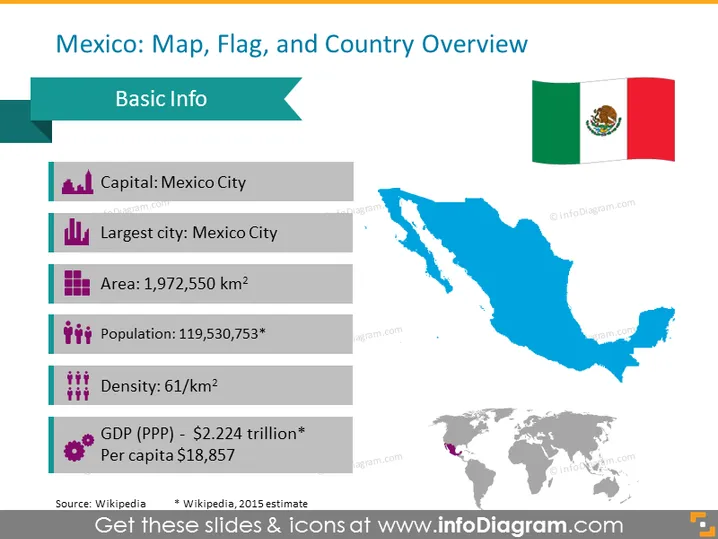
Mexico: Map, Flag, and Country Overview
Slide Content
This PowerPoint slide is designed to provide a country overview for Mexico. The slide is titled "Mexico: Map, Flag, and Country Overview," with a list of basic information facts that includes the capital as Mexico City, which is also the largest city, an area of 1.972 million square kilometers, and a population of approximately 119.5 million according to a 2015 estimate. Additionally, the density is mentioned to be 61 people per square kilometer, and the GDP (PPP) is quoted as $2.224 trillion, with a per capita income of $18,857.
Graphical Look
- The title of the slide is in a large, bold font centered at the top in dark text.
- A turquoise ribbon banner sits behind the title, adding a contrasting color accent.
- To the upper right, a composite image of the Mexican flag is displayed with vibrant green, white, and red hues and the national emblem centered in the white stripe.
- Directly below the title is the subtitle "Basic Info" in a bold, uppercase font, set within a matching turquoise-colored tab.
- A large, blue silhouette of the map of Mexico occupies the right half of the slide, with no geographic details besides the overall country shape.
- On the left, a vertical list of Mexico's basic information is aligned with corresponding icons - purple bar chart icons indicate capital and largest city; purple square icon for area; population icon with human figures; density icon with more human figures indicating crowding; and a circular chart icon for GDP.
- A miniature gray world map is positioned at the bottom center of the slide, with Mexico highlighted in purple to indicate its location globally.
- Font colors for the main content range from dark gray for titles to lighter gray for some details, ensuring good contrast against the white background.
The slide uses a clean, minimalist design with a clear color scheme that emphasizes the key ### Use Cases

- This slide could be used in educational or business presentations focusing on global markets or geography to introduce data about Mexico.
- In international relations or diplomacy, such a slide provides a quick reference to essential country statistics.
- During a company's market analysis briefing when discussing expansion or investment strategies in Mexico.
- The slide is suitable for travel and tourism industry presentations that require an overview of destination countries.
How to Edit
How to edit text & colors

How to expand / shorten diagram

How to Replace Icons in infoDiagram PPT


